
Osmar – Don’t Miss this New R-Geo-Package! The osmar-package enables you to retrieve all geographic elements of OpenStreetMap via its API.I.e., you can retrieve a street, river, state-boundary or whatever and use this as a spatial object in R.

It's overwhelming thinking of the endless playground that is opened for R-users by this package! And, owing to altruistic R-package authors (like the ones of osmar, Thomas Schlesinger and Manuel J. A. Eugster) the oligarch's (ESRI) power evermore crumbles away.. To leave a comment for the author, please follow the link and comment on his blog: theBioBucket*. R-bloggers.com offers daily e-mail updates about R news and tutorials on topics such as: visualization (ggplot2, Boxplots, maps, animation), programming (RStudio, Sweave, LaTeX, SQL, Eclipse, git, hadoop, Web Scraping) statistics (regression, PCA, time series, trading) and more...
Mailing List Archives - Grokbase. R news & tutorials from the web. R-Uni (A List of Free R Tutorials and Resources in Universities webpages) R news & tutorials from the web. R spatial projects. R-sig-geo - Read HDF files. R-GIS. Analysis of Spatial Data. GSP's Guide to netCDF and R. NetCDF is a common, self-describing, portable binary format for geophysical data.

GSP made an executive decision earlier this year (i.e. Tim and Doug talked after lunch) to use this format as much as possible when creating or manipulating data sets. For the statistical readership we should note that there are contributed packages for R that allow for the efficient reading and writing of netCDF files and part of the intent of this web page is to provide some simple examples to get users started. Some advantages of this format are: The netCDF libraries to create and access files for many (all?) With regards to netCDF, a little philosophy goes a long way. The netCDF file can be broken down into logical parts. There are a set of integer scalars called dimensions that declare the lengths of the following variables.
There are three variables in this netCDF file, but two of them have the same name as the dimensions! Finally, we get to a variable that is not named the same as a dimension. MCMC-UseR.pdf (application/pdf-Objekt) Producing Simple Graphs with R. Axes and Text. Many high level plotting functions (plot, hist, boxplot, etc.) allow you to include axis and text options (as well as other graphical paramters).
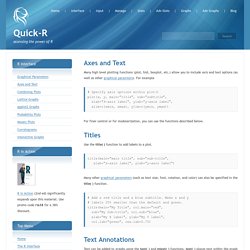
For example # Specify axis options within plot() plot(x, y, main="title", sub="subtitle", xlab="X-axis label", ylab="y-axix label", xlim=c(xmin, xmax), ylim=c(ymin, ymax)) For finer control or for modularization, you can use the functions described below. Titles Use the title( ) function to add labels to a plot. title(main="main title", sub="sub-title", xlab="x-axis label", ylab="y-axis label") Many other graphical parameters (such as text size, font, rotation, and color) can also be specified in the title( ) function. # Add a red title and a blue subtitle.
Text Annotations Text can be added to graphs using the text( ) and mtext( ) functions. text( ) places text within the graph while mtext( ) places text in one of the four margins. text(location, "text to place", pos, ...) mtext("text to place", side, line=n, ...) Common options are described below.