
Download the 120 best free fonts. In this freshly updated free fonts for designers post, we bring you the world's best free fonts.
We've filtered out the diamonds from the thousands of less perfectly designed free fonts available online, for you to use in your designs and illustrations. Get Adobe Creative Cloud now This list represents the 55 best free fonts we've found in eight categories. You can use the drop-down menu at the top of the page, or the boxout, right, to jump to the section you want. PhoneGap VS Appcelerator.
PhoneGap. How to build an app: 35 great tutorials. Backbone.js Tutorials. PhoneGap. PhoneGap and jQuery Mobile vs. Sencha Touch. PhoneGap Build lets web developers create native mobile apps for iOS and Android without learning Objective C or Java, while still being able to access native hardware features like vibration, accelerometer, camera, and so forth.

This is great if you are a web developer and need to develop a native mobile app on multiple platforms (iOS, Android, etc.) I was fortunate enough to be able to attend Web Unleashed 2012, a two-day “Front End Developer Event” near Boston, where they discussed mobile app development. One of the highlights for me was a presentation called “Building Multiplatform Apps with HTML & JavaScript Using PhoneGap Build”, by Brian Rinaldi from Adobe.
PhoneGap From Scratch: Introduction. Want to learn how to use PhoneGap, but don't know where to get started?
High Defintion Video Tutorials for PhoneGap and Dreamweaver CS5.5 or CS6 Development. Location - How to measure GPS signal strength on Android. Open Source Mobile Cloud Platform. jQueryMobile et PhoneGap : un duo gagnant pour vos applications mobiles ? Le succès des smartphones, tablettes, et autres mobile devices ne semble, malgré la crise, subir aucun ralentissement : sur 2011 on observe une augmentation des ventes de smartphones de 74% et un total de 63 millions de tablettes vendues.

Pour nos clients, cela déclenche une remise en perspective de leur stratégie : “comment proposer mes services mobiles à la population la plus large possible”, “comment m’adapter aux nouveaux canaux de diffusion que sont les App Store et Google Play” ou encore “puis-je maitriser mes coûts de développement et de maintenance sur ces X plateformes”. Dans cet article, je vais essayer de vous présenter l’approche que j’ai utilisé pour un client. jQueryMobile, les composants graphiques jQueryMobile est un framework qui permet, à partir de pages HTML5/CSS3, d’obtenir des écrans et des composants graphiques adaptés au rendu sur un écran de smartphone ou tablette. Exemple “quick & dirty” Cinématique des écrans. Static Maps API V2 Developer Guide - Google Maps Image APIs. The Google Static Maps API lets you embed a Google Maps image on your web page without requiring JavaScript or any dynamic page loading.

The Google Static Map service creates your map based on URL parameters sent through a standard HTTP request and returns the map as an image you can display on your web page. New! The Google Static Maps API Usage Limits have changed. Creating an API key and including it in your request allows you to track usage in the APIs Console, and to purchase additional quota if required. This document details the Static Maps API v2. jQuery Mobile. Two-Minute Tutorials 0. TMT0 Use AppLaud to Create a Web App Project, Run it on a Device or Simulator *Primer tutorial for MDS AppLaud 1.2 Eclipse Plugin for PhoneGap for Android AppLaud Plugin Intro Video The first Two-Minute Tutorial (TMT0) presents in detail the steps to create a new project, understand project and file contents, enable and review JSLint settings, and run the app on a device or simulator.

Use jQuery Mobile to Build a Native Android News Reader App. In this three part tutorial series, our main goal is to describe how jQuery Mobile can be used to develop a native Android application.
First, we will develop a stand-alone, sample web application that will browse articles from Yahoo! News using jQuery Mobile. Then we will convert that web application into a native Android application with minimal effort. The jQuery Mobile project is a mobile web framework with its alpha 2 version released in November, 2010. Tutorial: Developing a PhoneGap Application. In this tutorial, you create a fully functional employee directory application with PhoneGap.
You will learn: How to use different local data storage strategies.How to use several PhoneGap APIs such as Geolocation, Contacts, and Camera.How to handle specific mobile problems such as touch events, scrolling, styling, page transitions, etc.How to build an application using a single page architecture and HTML templates.How to build (compile and package) an application for 6 platforms using PhoneGap Build. jQuery Mobile "Getting Started" Application. A couple of weeks ago, I shared an Employee Directory sample application built with jQuery Mobile and PhoneGap.

That application was implemented “Ajax-style”, keeping the UI and the data access code cleanly separated. In other words: no server code intermingled in the HTML markup. A number of people have asked for a similar example using a “classic” (non-Ajax) implementation where pages (markup + data) are entirely built at the server-side before being delivered to the client. So, here is simpler version of the same application built “sans Ajax”. I used PHP in this version, but you can of course use your favorite server-side technology (Java, .NET, CF, RoR, etc). Sample Application using jQuery Mobile and PhoneGap. Here is a simple application I built using jQuery Mobile and PhoneGap.
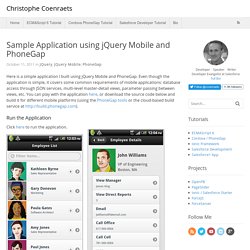
Even though the application is simple, it covers some common requirements of mobile applications: database access through JSON services, multi-level master-detail views, parameter passing between views, etc. Using Parse.com with PhoneGap: A marriage made in Awesome. When you build applications that allow end users to store content, you must find a solution to store that data in a persistent manner. You have a few options: You can store all the data locally on the device itself. PhoneGap provides access to a client-only database solution via its Database API. This works well, especially with developers used to working with SQL databases. Bperin/HttpRequest. Getting started with PhoneGap in Eclipse for Android. Note: Be sure to change the version number of the Cordova JavaScript file to match the version of PhoneGap/Cordova that you are using. Eclipse is an open source integrated development environment (IDE) that supports many technologies, but this article is focused on its support of Java, the native language for Android applications.
Android is Google's open source mobile operating system. Android is the operating system for many smartphone and tablet devices, including the Samsung Galaxy line of phones and tablets, the Amazon Kindle Fire tablet, and the Barnes and Noble Nook tablet, as well as many other devices from numerous manufacturers. Cordova. About Apache Cordova™ Apache Cordova is a set of device APIs that allow a mobile app developer to access native device function such as the camera or accelerometer from JavaScript. Combined with a UI framework such as jQuery Mobile or Dojo, this allows a smartphone app to be developed with just HTML, CSS, and JavaScript.
When using the Cordova APIs, an app can be built without any native code (Java, Objective-C, etc) from the app developer. Instead, web technologies are used, and they are hosted in the app itself locally (generally not on a remote http server). And because these JavaScript APIs are consistent across multiple device platforms and built on web standards, the app should be portable to other device platforms with minimal to no changes.
Apps using Cordova are still packaged as apps using the platform SDKs, and can be made available for installation from each device's app store. Apache Cordova API Documentation. This guide describes how to set up your development environment for Cordova and run a sample application. 1. Minimum Requirements for Development Identical to Android Minimum Requirements 1.1 Supported Android Devices Android 2.1 (Deprecated May 2013)Android 2.2Android 2.3Android 3.x (Deprecated May 2013)Android 4.x We currently do not support Android 1.x, and we plan to deprecate platforms in the future as they are updated and dip below 5% on the distribution dashboard provided by Google. 2.
Download and install Eclipse ClassicDownload and install Android SDKDownload and install ADT PluginDownload the latest copy of PhoneGap and extract its contents. Download & Archives. Draw 9-patch. The Draw 9-patch tool allows you to easily create a NinePatch graphic using a WYSIWYG editor. For an introduction to Nine-patch graphics and how they work, please read the section about Nine-patch in the 2D Graphics document. Here's a quick guide to create a Nine-patch graphic using the Draw 9-patch tool. You'll need the PNG image with which you'd like to create a NinePatch.
From a terminal, launch the draw9patch application from your SDK /tools directory. Android Development. Créez des applications pour Android. Creating an Android Project. An Android project contains all the files that comprise the source code for your Android app. This lesson shows how to create a new project either using Android Studio or using the SDK tools from a command line. Note: You should already have the Android SDK installed, and if you're using Android Studio, you should also have Android Studio installed.
If you don't have these, follow the guide to Installing the Android SDK before you start this lesson. Android Development Tutorial. 1.1. Android Development Tutorial. Forum. Android SDK. Before installing Android Studio or the standalone SDK tools, you must agree to the following terms and conditions.
Créer sa première webapp iOS et Android avec Sencha Touch. Depuis l’explosion du nombre de smartphones et l’émergence des deux systèmes mobiles Android et iOS, puis WP7, développer pour mobile devient, en même temps que leurs capacités augmentent, de plus en plus dur à cause du nombre d’appareils différents.