
PostfixDovecotSASL. This guide will guide you through the steps needed to enable Postfix to use the SASL implementation provided by Dovecot.

This is an alternative to configuring Postfix to use the Cyrus SASL implementation. Everything you need to configure Postfix to use Dovecot SASL is included when you install the dovecot-common and postfix packages from the Main repository. You will probably also want to install dovecot-imapd or dovecot-pop3d which provide IMAP and POP3 services. See the Dovecot guide for more information on setting up Dovecot. Dovecot First let's configure Dovecot to provide SASL client authentication. If you're using Ubuntu 7.10 (Gutsy) or newer version, your configuration should look like this: auth default { mechanisms = plain login socket listen { #master { # Master socket provides access to userdb information.
The /etc/dovecot/dovecot.conf file on Ubuntu 6.06 (Dapper) is slightly different: Once you've configured Dovecot to provide SASL you'll need to restart it: Postfix ehlo localhost. PostfixCompleteVirtualMailSystemHowto. There are many howtos in the Internet about setting up mail servers and various people has various choice of MTAs.

Some like, Qmail, while some like Postfix or Exim. I have been using Qmail for a long time and it is an excellent MTA. The way the Qmail is licensed and distributed that there are no binary packages so that users can easily setup with their favorite distribution, and installing basic Qmail setup even is not that difficult but users need applied various patches and tweaks etc to get a complete setup done.
With all these issues Qmail is the preferred choice of many geeks, since it won't give you head ache once up and running. The drawback is that this system is difficult to upgrade since users need to compile the source code and install. The decision behind this guide is to use Postfix, an equally secure and fast MTA like Qmail, it is easy to configure and setup a Basic System in any Linux distribution. It is important to know how our system works before going to install. PostfixBasicSetupHowto.
This document will teach you how to set up a basic Postfix mail server with IMAP and POP3 services.
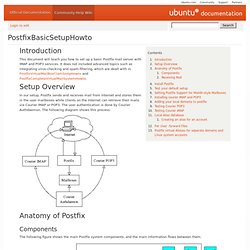
It does not included advanced topics such as integrating virus-checking and spam-filtering, which are dealt with in PostfixVirtualMailBoxClamSmtpHowto and PostfixCompleteVirtualMailSystemHowto. In our setup, Postfix sends and receives mail from Internet and stores them in the user mailboxes while clients on the Internet can retrieve their mails via Courier IMAP or POP3. The user authentication is done by Courier Authdaemon. The following diagram shows this process. Components The following figure shows the main Postfix system components, and the main information flows between them. Yellow ellipsoids are mail programs. Receiving Mail When a message enters the Postfix mail system, the first stop is the incoming queue.
Mail is posted locally. In this setup I assume that your domain is yourdomain.com and it has a valid MX record setup as mail.yourdomain.com. Dig mx yourdomain.com su - fmaster mail. Postfix. Postfix is the default Mail Transfer Agent (MTA) for Ubuntu.

It is in Ubuntu's main repository, which means that it receives security updates. This guide explains how to install and configure postfix and set it up as an SMTP server using a secure connection. In other words, it's a mail server not a mail client like Thunderbird, Evolution, Outlook, Eudora, or a web-based email service like Yahoo, GMail, Hotmail, Earthlink, Comcast, SBCGlobal.net, ATT.net etc.... If you worked for a company named Acme and owned acme.com, you could provide your employees with email addresses @acme.com. Employees could send and receive email through your computer, but not without your computer running all the time.
In order to install Postfix with SMTP-AUTH and TLS, first install the postfix package from the Main repository using your favorite package manager. Sudo apt-get install postfix Simply accept the defaults when the installation process asks questions. From a terminal prompt: Finally, start saslauthd: