
Google Products. Google Sites II. Google Drive. Google Sites. The end of Google Reader. Google URL Shortener. Posted by Michael Hermanto, Software Engineer, Firebase We launched the Google URL Shortener back in 2009 as a way to help people more easily share links and measure traffic online.
Since then, many popular URL shortening services have emerged and the ways people find content on the Internet have also changed dramatically, from primarily desktop webpages to apps, mobile devices, home assistants, and more. To refocus our efforts, we're turning down support for goo.gl over the coming weeks and replacing it with Firebase Dynamic Links (FDL). FDLs are smart URLs that allow you to send existing and potential users to any location within an iOS, Android or web app. We're excited to grow and improve the product going forward. For consumers Starting April 13, 2018, anonymous users and users who have never created short links before today will not be able to create new short links via the goo.gl console. After March 30, 2019, all links will continue to redirect to the intended destination. Goosh.org - the unofficial google shell. Google Reader. iGoogle. 100+ Google Tricks That Will Save You Time in School – Eternal Code.
[via onlinecolleges.net] With classes, homework, and projects–not to mention your social life–time is truly at a premium for you, so why not latch onto the wide world that Google has to offer?

From super-effective search tricks to Google hacks specifically for education to tricks and tips for using Gmail, Google Docs, and Google Calendar, these tricks will surely save you some precious time. Search Tricks These search tricks can save you time when researching online for your next project or just to find out what time it is across the world, so start using these right away.
Convert units. Google Specifically for Education From Google Scholar that returns only results from scholarly literature to learning more about computer science, these Google items will help you at school. Google Scholar. Google Docs Google Docs is a great replacement for Word, Excel, and PowerPoint, so learn how to use this product even more efficiently. Use premade templates. Gmail Use the Tasks as a to-do list.
Simply Google, Google search and service, Google Desktop, Google Earth, Google Video Player,Google Talk. Google Guide Quick Reference: Google Advanced Operators (Cheat Sheet) The following table lists the search operators that work with each Google search service.
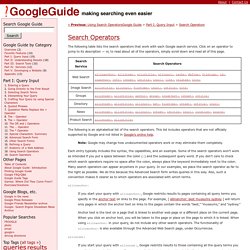
Click on an operator to jump to its description — or, to read about all of the operators, simply scroll down and read all of this page. The following is an alphabetical list of the search operators. This list includes operators that are not officially supported by Google and not listed in Google’s online help. Each entry typically includes the syntax, the capabilities, and an example. Some of the search operators won’t work as intended if you put a space between the colon (:) and the subsequent query word.
Allinanchor: If you start your query with allinanchor:, Google restricts results to pages containing all query terms you specify in the anchor text on links to the page. Anchor text is the text on a page that is linked to another web page or a different place on the current page. Allintext: allintitle: allinurl: In URLs, words are often run together. Author: cache: define: ext: filetype: group: id: inanchor: