
Random Linux Commands to Make Google Talk, Fix Wifi, Find Duplicate Files, and More. Did you know you can make Google Translate talk?

Preview Unicode characters on the command line? Generate entropy with the ls command? Use md5sum hashes to find duplicate files, regardless of their names? Test speakers? Fix roaming wifi? Google's TTS Translator I learned about Google's text-to-speech translator from the wonderful @climagic on Twitter. . $ wget -q -O- -U Mozilla |mpg123 -q -w - - |play -t wav - -t wav -t alsa pitch -1200 It also works with the command-line mode of VLC, cvlc. . $ wget -q -O- -U Mozilla " |cvlc - |play -t wav - -t wav -t alsa This relies on the Google text-to-speech translator, which is the engine for the TTS functions on Google Play, Android, and i-Devices. Google TTS isn't very well-documented for users, but there is some good developer information at chrome.ttsEngine. Preview Unicode Characters This is a quick way to see if your system renders them correctly: $ echo -e \\u2666 ♦ That should look like a little diamond.
Unusual Tasks With File Listings. Springseed.
20 Must-Have Ubuntu Showdown Apps. Last month developers across the world spent three short weeks crafting over 130 applications as part of the Ubuntu App Showdown contest.

From these, three winners were picked by a jury of judges: RSS reader ‘Lightread‘, puzzle game ‘Picsaw‘ and web-app creator ‘Fogger’. But that’s not where the contest ends. It’s now up to you to decide which apps win the last 3 prizes up for grabs. To help you get started we’ve listed our top 20 submissions – jury winners omitted – that are worth installing regardless of whether you intend to vote or not.
Note: The following are not presented in any sort of order. XKCD Browser As the name might suggest, XKCD Browser brings the popular online web-comics on to your desktop. Comics browser are cached for offline-reading; further infromation on the comic can be viewed by hovering over the image, and Gwibber integration lets you share anything funny you come across to Twitter or Facebook with a simple click. Blubphone Postman Cuckoo Tastebook CuttleFish Discuvr Circle. Latest Skype Release Added to Ubuntu Software Center.
Skype have been dutifully updating their Linux client over the last few months but until today Ubuntu users needed to manually download and install the app from Skype’s website to get the latest version.

But a new upstream release of Skype – though not the most recent – has been added to the Ubuntu Software Center, meaning a new, stable release of Skype is but a few clicks away. Skype 4.0 Skype 4.0.0.7 brings a number of interface changes and improved features over the 2.2.0.35 release previously stocked in the Software Center. Amongst these are: New Conversation and call viewsImproved audio and video QualityAdditional Web Cam Supportimproved chat synchronisationNew status icons and emoticons“Tabbed” conversations Install Skype 4.0 in Ubuntu 12.04 Getting Skype 4.0 on Ubuntu is super easy.
If you already have Skype installed you will find this update waiting for you in the Update Manager. After running an update/refresh, open the Software Center and search for and install the ‘Skype’ package. [How To] Install Ubuntu’s New Web Apps Feature in 12.04 & 12.10. ScreenCloud Lets You Take, Share Ubuntu Screenshots Quickly. A new screenshotting tool has been added to the Ubuntu Software Center.
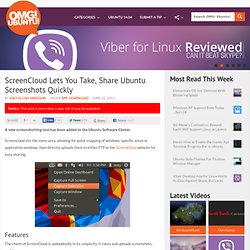
Screencloud sits the menu area, allowing for quick snapping of windows, specific areas or application windows, then directly uploads them to either FTP or the ScreenCloud website for easy sharing. Features The charm of ScreenCloud is undoubtedly in its simplicity. It takes and uploads screenshots, nothing more. But for advanced options you’ll want to head on into the preferences. Set timer delayEnable ‘Capture window borders’Enable/Disable NotificationsSet app to run on start upAdjust account/upload/filename/shortcut settings Uploading One drawback is that to share photos on the ScreenCloud service you need to sign up for an account. With FTP or ScreenCloud account set up, screenshots are automatically uploaded seconds after being taken. Screencloud is a free download, available from the Ubuntu Software Center. [download4ubuntu url="