
Web Safe Font Cheat Sheet v.2 - Including Google Font API. Here is the second release of the Web Safe Font Cheat Sheet, which includes updated statistics, better printability and a quick reference for using Google’s new Font API and Directory.

This article was originally posted in May 2010. You can find out about Version 3 of the Web Safe Fonts Cheat Sheet here What’s New? Updated Stats As explained in the original article the main installation percentages are calculated by combining data from the ‘Web Fonts Survey’ produced by Code Style and NetMarketShare. I have not yet included mobile operating system market share in these calculations (Net Market Share does) as there is so much variation in system fonts that it becomes next to impossible to factor in every situation. More Printable Version 2 of the Cheat Sheet is plainer and this is in response to requests to make it more readable on domestic-level printers. All the content is included well within any margins that your printer may impose.
Google Font API The Google Font API in More Detail. Bulletproof @font-face syntax. Let me introduce you to the best way to do your @font-face definitions: This is the Fontspring @font-face syntax.

I’ll circle back to why this is the best possible solution but let’s first review the other techniques’ weaknesses. Of course, the problem at the center of this is that IE needs an .eot font, and the other browsers must take a .ttf or .otf. May 12th, 2010. If you’re looking to just put @font-face to use today, just head to FontSquirrel’s generator. Okay, let’s see what we got here… Conditional comments (via) Ugh. Double declarations (via) The problem here is that, as Andrea points out, IE will actually download the .otf file. Because after all, IE doesn’t understand the format hint, right? GraublauWeb.otf’)%20format(‘opentype Oops, looks like someone forgot a ? Mo’ Bulletproofer (via) Richard Fink proposed this alternate syntax actually as a response to this post, but I’ve included it back here.
The local reference Much more concise and clean. Nice Web Type – How to use CSS @font-face. Code up top for quick reference, details down below—we’ll prepare typefaces for use on the web, go through @font-face CSS line-by-line, and get the experts’ take on browser support.
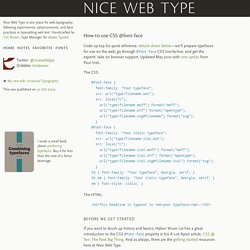
Updated May 2010 with new syntax from Paul Irish. The CSS: The HTML: <h2>This headline is typeset in <em>your typeface</em>. </h2> Before we get started If you want to brush up history and basics, Håkon Wium Lie has a great introduction to the CSS @font-face property in his A List Apart article, CSS @ Ten: The Next Big Thing.
Acquire a typeface You may have a typeface in mind, or you may have no idea where to begin. I have also experimented with several properly-licensed typefaces in a series I call Nice Web Type Likes, providing bits of advice with each example and explaining what I feel are each typeface’s merits. For this demonstration I’ll use Fontin Sans from Exljbris. /* A font by Jos Buivenga (exljbris) -> www.exljbris.nl */ Go grab a properly licensed typeface, then continue reading here. Tools vs. <!