facebook graph api

TwitterFacebook
Get flash to fully experience Pearltrees
Getting Started If you're new to the Graph API you should start with the Graph API Getting Started Guide . The Graph API is the primary way that data is retrieved or posted to Facebook. The Getting Started Guide contains an overview of the basics of the API, walks you through using the Graph API Explorer , shows you how names work, how permissions work, what connections are and puts it all together so the rest of this reference make sense. Reading Data http://developers.facebook.com/docs/reference/api/

Graph API

Dialogs Overview

Dialogs provide a simple, consistent interface to provide social functionality to your users. Dialogs do not require any additional permissions because they require user interaction. Dialogs can be used by your application in every context: within a Canvas Page , in a Page Tab , in a website or mobile web app, and within native iOS and native Android applications. There are currently 7 Dialogs available for you to use: The Feed Dialog allows a user to post a story to their Timeline and to their friends' News Feeds The Login Dialog allows a user to authorize an application as part of an authentication flow. http://developers.facebook.com/docs/reference/dialogs/
http://developers.facebook.com/docs/reference/dialogs/requests/

Requests Dialog

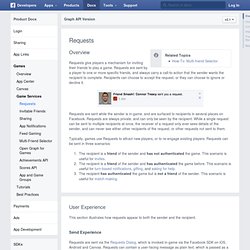
Overview The Request Dialog sends a Request from one user (the sender) to one or more users (the recipients). The Request Dialog can be used to send a Request directly from one user to another or display a Multi Friend Selector Dialog, allowing the sending user to select multiple recipient users. This documentation covers the Request Dialog API. For more information on the full set of features available to Requests including how recipient users interact with a Request be sure to check out the Requests Docs .
http://developers.facebook.com/docs/reference/dialogs/add_to_page/ Overview The Add Page Tab Dialog prompts the user to add an app to a Facebook Page that the user admins. This does not require any extended permissions. JavaScript Example The following simple JavaScript example demonstrates using the FB.ui method in the JavaScript SDK to use the Add Page Tab Dialog:

Add Page Tab Dialog

Pay Dialog

Overview The Pay Dialog prompts users to initiate Facebook Credits orders. Developers integrating this dialog can enable their users to pay for digital goods and to earn virtual currencies . Additional notes: Only apps on Facebook can open the this dialog. http://developers.facebook.com/docs/reference/dialogs/pay/

OAuth Dialog

http://developers.facebook.com/docs/reference/dialogs/oauth/ The OAuth Dialog is used within the authentication flows to enable a user to authorize your application and to grant additional permissions to your app. Facebook's authentication flows are based on the OAuth 2.0 protocol. While the dialog can be invoked using the JS SDK , the iOS SDK and the Android SDK , it can also be invoked directly by opening a URL in the user's web browser. Constructing a URL to the OAuth Dialog To invoke the OAuth Dialog, redirect the user's browser to a URL of the form: http : //www.facebook.com/dialog/oauth/?
http://developers.facebook.com/docs/reference/dialogs/feed/

Feed Dialog

Overview The Feed Dialog prompts a person to publish an individual story to a profile's timeline. This does not require any extended permissions. Your application can also publish directly to a profile's timeline without interaction on the part of someone using your app. To accomplish this, use the corresponding Graph API call .
Overview The Send Dialog lets people to send content to specific friends. They’ll have the option to privately share a link as a Facebook message, Group post or email. You should specify a URL, and you can pre-populate a user in the ‘to’ field. http://developers.facebook.com/docs/reference/dialogs/send/

Send Dialog