
Using the navigator object to detect client's browser. Using the navigator object to detect client's browser Last updated: January 20th, 15' Until one browser remains standing on the web (if ever), browser detection will continue to be part of any good JavaScripter's life.
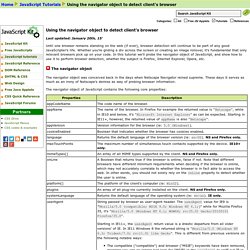
Whether you're gliding a div across the screen or creating an image rollover, it's fundamental that only relevant browsers pick up on your code. In this tutorial we'll probe the navigator object of JavaScript, and show how to use it to perform browser detection, whether the subject is Firefox, Internet Explorer, Opera, etc. Browser detect. A useful but often overrated JavaScript function is the browser detect.

Sometimes you want to give specific instructions or load a new page in case the viewer uses, for instance, Safari. If you're new to JavaScript, don't use browser detects. You don’t need them. Please read the object detection page first. This page used to contain my own browser detect script, but I found that I do not have enough time to keep it up to date. Object detection. Page last changed today Fairly soon you will notice that certain features of JavaScript do not work in certain browsers.

If you want to use an advanced bit of script, you first have to check whether a browser supports the objects you want to use. This page explains how to do it. If you want to know whether the browser that views your page supports certain objects you want to use in your code, you should never EVER use a browser detect. Sure, you know that this–and–that browser will support your code while such–and–so browser won’t.