
IPhone URL Schemes - akosma wiki. From akosma wiki This page centralizes code samples for URL schemes available in many iPhone applications, not only in Apple's but in many others.

It also includes programming tips and references about implementing apps registering or consuming URL schemes. HandleOpenURL: Shared Interapp Communication on iOS. Objective-C: Custom URL Schemes. The scheme name (or protocol) of a URL is the first part of a URL - e.g.
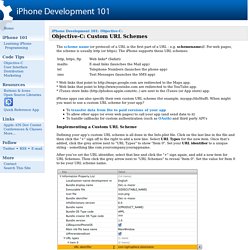
For web pages, the scheme is usually http (or https). The iPhone supports these URL schemes: * Web links that point to are redirected to the Maps app. * Web links that point to are redirected to the YouTube app. * iTunes store links ( are sent to the iTunes (or App store) app. App store - Open a existing app from own app ios. iPhone & Android App Design: Developers Cheat Sheet [Infographic] Designing a mobile app can seem simple when you are sketching it out on the whiteboard.
![iPhone & Android App Design: Developers Cheat Sheet [Infographic]](http://cdn.pearltrees.com/s/pic/th/developers-infographic-64216711)
But when you actually sit down in your developer environment and get cracking, turning your ideas into reality is not always so easy. That's only the beginning, of course. What if you need to design your app for both the iPhone and Android? You will very quickly learn that you cannot just cut and paste your design from one platform to the other. Android and iOS frameworks share some basic principles, but when it comes to design, they are as different as ebony and ivory.
For instance, the notification bars in iOS and Android may look similar, but they perform different functions on each platform. Here’s a quick reminder, from StackOverflow: Density-independent Pixels - an abstract unit based on the physical density of the screen. iOS Fonts. Briefs. How To Use UIScrollView to Scroll and Zoom Content Ray Wenderlich.
Tips for Using UIImage Objective-C Class. UIImage is one of the most commonly used classes in iOS development.

It is generally used for drawing icons, backgrounds, etc. However, not all iOS developers realize how powerful this simple class may become with a proper approach. Today, I'm going to suggest several unusual ways of using UIImage to fill an area with a texture, create a stretchable UI element, changing and masking an image. Creating tiled backgrounds Let's begin with tiled backgrounds. UIImage *pattern = [UIImage imageNamed:@"TextureImage"]; self.view.backgroundColor = [UIColor colorWithPatternImage:pattern]; UIImage *pattern = [UIImage imageNamed:@"TextureImage"]; self.view.backgroundColor = [UIColor colorWithPatternImage:pattern]; Source image: Fill result: Creating stretchable images Another useful UIImage feature is creating stretchable images.
Button image in the project resources: Ios6-font... List of the fonts available in iOS6. Ios - How to properly create a UIButton that resizes to the text length in Xcode 4. Building Custom Map Annotation Callouts – Part 1 - Asynchrony Blog. The iPhone’s Map Annotation Callouts are very useful for displaying small amounts of information when a map pin (annotation) is selected.

One problem with the standard callouts present in iOS is the inability to change the height of the callout. For example, you may want to display a logo or other image that is taller than the default callout. Or you may want to display an address and phone number on separate lines under the title. Both of these scenarios are impossible using the standard iOS callouts. There are many steps to building a good replacement callout with the proper look and behavior, but it can be done. Iphone - How to add a uibutton to custom annotation view. Custom video player on the iPad / iPhone. In Cocoa, you can use the MPMoviePlayerController to play .mov videos.

The player controller provides you with standard video controls which are fine until you need to build something that is visually suitable for you application. Fortunately, you can hide the controls and build your own from scratch. Play / Pause buttons These buttons are pretty easy to make. As MPMoviePlayerController implements the MPMediaPlayback protocol, you can simply call MPMediaPlayback‘s: Custom UI Controls for iOS and Mac OS X - Cocoa Controls. GIKAnimatedCallout for iOS. Geofencing with Core Location. With the release of iOS 4, the Core Location framework received a significant update by providing support for geofencing.

Not only can an application be notified when the device enters or exits a geofence, the operating system also notifies when the application is in the background. This addition to the Core Location framework fits neatly in Apple's endeavor to support multitasking on iOS. This opens up a number of possibilities, such as performing tasks in the background through geofencing and that is exactly what this tutorial is about. NSCookbook.com — iOS Programming Tutorials in Recipe Form.
iOS InAppPurchases - Objective-C - iPad - iPhone - UIKit. How to build a custom control in iOS - Think & Build. Following the many requests on Reddit, here we go with the first article about custom controls.
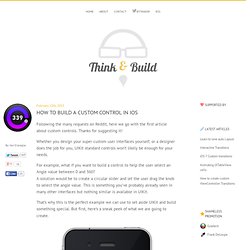
Thanks for suggesting it! Whether you design your super custom user interfaces yourself, or a designer does the job for you, UIKit standard controls won’t likely be enough for your needs. For example, what if you want to build a control to help the user select an Angle value between 0 and 360? A solution would be to create a circular slider and let the user drag the knob to select the angle value. This is something you’ve probably already seen in many other interfaces but nothing similar is available in UIKit. That’s why this is the perfect example we can use to set aside UIKit and build something special. Subclassing UIControl The UIControl class is subclass of UIView and it is the parent of every UIKit control (such as UIButton, UISlider, UISwitch and so on). iPhone Tutorials. A simple example of navigator.geolocation.watchPosition()
iOS KML Framework. Brow/leaves. An Example iOS 5 iPhone UIPageViewController Application. From Techotopia The previous chapter entitled Implementing a Page based iOS 5 iPhone Application using UIPageViewController covered the theory behind implementing page curling view transitions using the UIPageViewController class.

This chapter will work through the creation of an application designed to demonstrate this class in action. [edit] The Xcode Page-based Application Template When creating a new project within the Xcode environment, an option is provided to base the project on the Page-based Application template. Iphone - UIWebView scrollView in iOS 4 doesn't call contentOffset. Objective c - Combining contentOffset in an if statement? iOS. UX Archive. Core-plot - Cocoa plotting framework for OS X and iOS. Core Plot is a plotting framework for OS X and iOS.

It provides 2D visualization of data, and is tightly integrated with Apple technologies like Core Animation, Core Data, and Cocoa Bindings. Release 1.4 Download | Browse Source | OS X Docs | iOS Docs Release 1.3 Download | Browse Source | OS X Docs | iOS Docs Release 1.2. Creating iPad Application Preferences. Creating application preferences for your iPad application is a pretty straightforward process. The process involves adding a resource called the Settings Bundle to your project, configuring a property list file, and then deploying your application. iOS 6: Pull to Refresh (UIRefreshControl) We’ve all seen them in apps: a screen is refreshed by pulling down on the view.
A little wheel starts spinning at the top, until the refresh has completed. At that time, the wheel disappears, and the view bounces back into place. Many of us have built our own custom versions of this functionality, however, as of iOS 6, things have gotten quite a bit easier. Getting Started with AFNetworking · AFNetworking/AFNetworking Wiki. Web color to UIColor convertor. Pantone ® Colours - Lab, RGB & Hex Codes.