
Kathy Schrock's Guide to Everything - Home Page. The 100 Best Twitter Tools For Teachers (2012 Edition) 20 Twitter Hashtags Every Teacher Should Know About. Twitter chats are such a great way to stay connected and informed in your professional circle , and education is no exception. Through education chats, you can find out about new methods for teaching, tech resources, even jobs for teachers. Most chats are held weekly, and offer an opportunity to have a regularly scheduled conversation with like-minded educators. Check out our collection to find a wealth of Twitter chats that are great for all kinds of educators.
General These Twitter chats cover anything and everything in education, and represent a great jumping off point for those just getting started in Twitter education chats. #edchat – Talk to a variety of educators around the world through #edchat, Tuesdays at noon and 7 p.m. Administration and Behavior Check out these Twitter chats to get connected and discuss topics concerning school administrators. #AcAdv – Tuesdays from 8-9 p.m. Subject Chats. Top 10 Twitter Hash Tags To Follow For Education Technology. Twitter can be a fantastic resource for educators, particularly for those looking to pick up the latest tips and tricks on using technology in education.
But it can also be a confusing and overwhelming mass of information, which is difficult to navigate and can be frustrating if you are looking for particular information within the masses of tweets. The fantastic response to last week’s article on the ‘Top 10 Twitter Accounts to Follow for Education Technology’ proved that busy educators are keen to be guided straight to the best available information on Twitter; so here are 10 great hash tags to follow for a wealth of education technology information straight to your tweet feed! #edtech The primary hash tag for all things education technology, this yields thousands of fantastic tweets per hour, with typical content including cutting edge resources and great blogs and advice from seasoned experts on how to include new technology in your classroom.
#elearning #mlearning #web20 #flipclass #k12. Does Twitter Matter? Many people question the value of twitter and if it can really make an impact for an educator. After nearly two years as a user, I can say with little hesitation that twitter has impacted my life in ways both subtle and profound. Impacted my students Clearly anything that a teacher spends a significant amount of time engaging in and claiming it is “PD” should benefit the students, right? Well that is certainly true in my case. Five-Minute Film Festival: Learn to Use Web 2.0 Tools. While many of you may be heading for the beach this week, it won't be long before you're ready to start exploring some new tools to help your students be better creators and collaborators when you go back to school in the fall.
This week we published a new video on Nicole Dalesio, a fifth-grade teacher who uses all kinds of free technology tools in her class to keep her kids engaged, and it inspired me to go hunt down the best tutorials for all these great, free Web 2.0 tools. Did I mention most of them are free? While screen-cast tutorials may not be the most edge-of-your-seat viewing, once you've got the basics, you can start digging in to the tool itself. And the best part is, learning to use these tools is as fun for you as it is for your students.
What are you waiting for? Video Playlist: Web 2.0 Tools Tutorials for Teachers Keep watching the player below to see the entire playlist, or view this playlist on YouTube. More on Free Web 2.0 Tools. SCSElementaryPrincipals - home. Youpd.
Web 2.0 Education. A List of 20 Free Tools for Teachers to Create Awesome Presentations and Slideshows. Below is a list of some of the best free tools teachers and students can use to create awesome slideshow and presentations. 1- KnovioKnovio gives life to static slides and with a simple click you will be able to turn them into rich video and audio presentations that you can share with your friends and colleagues via email or popular social media websites.
Knovio does not require any software installation or download, it is all web based. 2- AheadAhead is a great presentation tool for educators. It works in such a way that it instantly transforms your layouts into a zooming presentation. Check it out its is great. 3- HelloSlideHelloSlide is a cool web tool that allows its users to create awesome slides together with voice narration. Online Tools. Web 2.0 Teaching Tools. Top 13 Web 2.0 Tools for Classrooms. Every day in my K-8 tech classes, I use a variety of cloud-based tools to enhance the learning experience for my students.
There are more of these ‘Web 2.0′ tools than I can keep up with, but when you teach tech or coordinate technology for your school, ‘keeping up’ is part of your job. Here’s how I determine which of these hundreds (thousands?) Of tools are student-ready: Before I introduce a tool to my class, I try it myself. If a tool passes these two tests, I try it in class. Here’s my list of 2011 favorites that have run that gauntlet: BigHugeLabs–create trading cards, posters, puzzles, mosaics using the student’s own images.
Here are a few more great ones that I didn’t consider in my Top 13 because most educators already know about them: Edmodo–a micro-blogging service (like Twitter) for teachers and students. Should be on the list, but I’ve had too many problems either in their set-up or stability of their platform: Follow me Like this: Like Loading... Related. Bloomin' Apps. This page gathers all of the Bloomin' Apps projects in one place.Each image has clickable hotspots and includes suggestions for iPad, Android, Google and online tools and applications to support each of the levels of Bloom's Revised Taxonomy.I have created a page to allow you to share your favorite online tool, iOS, or Android app with others.
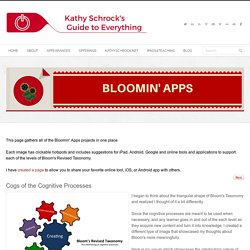
Cogs of the Cognitive Processes I began to think about the triangular shape of Bloom's Taxonomy and realized I thought of it a bit differently.Since the cognitive processes are meant to be used when necessary, and any learner goes in and out of the each level as they acquire new content and turn it into knowledge, I created a different type of image that showcased my thoughts about Bloom's more meaningfully.Here is my visual which showcases the interlocking nature of the cognitive processes or, simply, the "Cogs of the Cognitive Processes".
IPAD APPS TO SUPPORT BLOOM'S REVISED TAXONOMYassembled by Kathy Schrock iPads in the Classroom. My iPad 2 Education/School Apps (2011) [HD] QR Code Treasure Hunt Generator.