
How to post Google+ content directly to your weblog.-Dutchital.com. Google+ Video Guide (The New Google Plus Social Network) Video - How to easily transfer your Facebook friends to Google+ Holy Kaw! The Google+ project: Sparks The Google+ project: Explore Mobile The Google+ project: A quick look Beginners Guide to Google Plus How to change your Profile Picture on Google+ -Google plus for Beginners 1.2 35 Quick Google+ Guides, Tips, and Tricks. Google unveiled its top secret social network on June 28th and it already has 10 million plus users.
If you have received an invite and don’t know where to start or just want to know more about it, these 34 quick guides, tips, and tricks should help you learn everything you need to know. Google+ Guides 1. Google+: The complete Guide. via Mashable.com 2. 3. 4. 5. 6. 7. 8. 9. Plus - ManageFlitter - Twitter Account Management. Would you like your public Google+ Plus posts to automatically appear on Twitter?
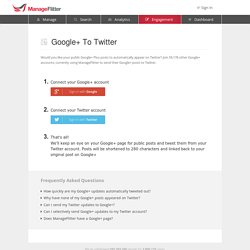
Join 59,178 other Google+ accounts, currently using ManageFlitter to send their Google+ posts to Twitter. Frequently Asked Questions How quickly are my Google+ updates automatically tweeted out? Pro and Business accounts are refreshed every few minutes, so new Google+ posts will be Tweeted with a minimal delay. Accounts that do not have a paid Pro or Business subscription will be refreshed once every 30 minutes, but only accounts that have logged into the ManageFlitter application within the past 30 days will be considered for a refresh. Sync Google+ to Twitter, Identi.ca and Facebook. Cross-post by sharing your post with our Google+ bot. Google Plus / + : simple tips and tricks for beginners.
Now that Google + is starting to take off we thought that you would like to find out some simple tips and tricks to assist you when using the new social networking service, in this article we will show you some neat little features and also tell you about some shortcuts / hotkeys. Firstly when you visit Google + the site responds to certain keys being pressed, if you press the spacebar you will scroll down the Stream, if you press Shift + Spacebar you will scroll back up. Similarly if you press ‘J’ your browser will jump down to the next post, or if you press ‘K’ it will jump up the Stream to the previous post. It is not obvious how to send someone a private message, however it is pretty simple. All you do is write your message and then make sure that it will not be broadcasted to any circles, simply start typing the recipients name and then choose the correct one from the drop-down list, once you click share it will be sent.
How To Use Google Plus. Waiting for a Google Plus invite?
Google is rolling out the service in waves and you can expect it to become a ubiquitous social option in the coming months. We have been playing with the service since getting invites yesterday and there are a lot of things to like about Google's new social initiative. Unlike Google's last big invite-only rollout of a social initiative - Google Wave - users will not be confounded on just what the heck you are supposed to with the service when signing up for the first time. From Friendster, Friendfeed, MySpace and Facebook, users are familiar with how a social platform is theoretically supposed to look. At its core level, Plus is not that much different. Create Your Circles Imagine the ability to break down Facebook into its various constituent parts and keep them separate from each other as opposed to one giant feed. From the initial interface, you will see four buttons - Home, Photos, Profile and Circles. Set up “yourdomain.com/+” Redirect to Google Plus, Facebook and Others.
You are here: SumTips » Tips 'n Tricks » Set up "yourdomain.com/+" Redirect to Google Plus, Facebook and Others With the launch of Google+, several web services such as gplus.to and iplus.im were born that let users create a vanity URL to their profile.
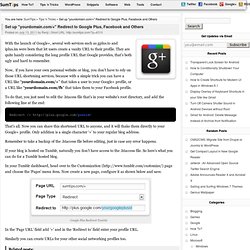
They are quite handy considering the long profile URL that Google provides, that’s both ugly and hard to remember. Now, if you have your own personal website or blog, you don’t have to rely on those URL shortening services, because with a simple trick you can have a URL like “yourdomain.com/+” that takes a user to your Google+ profile, or a URL like “yourdomain.com/fb” that takes them to your Facebook profile. To do that, you just need to edit the .htacess file that’s in your website’s root directory, and add the following line at the end: Redirect /+ That’s all. Remember to take a backup of the .htaccess file before editing, just in case any error happens.
Google+ Apps & Icons. Google+ Tips & Tools: Google Plus Guide. How to Get Google Plus Users Stream Updates Using RSS Feed. Home > Internet > How to Get Google Plus Users Stream Updates Using RSS Feed If you like many users on Google Plus and want to check their updates everyday then you need to open your favorite user stream one by one and check.
It is pretty cumbersome and takes time. But you can use RSS feed to get latest updates of your favorite Google Plus users. RSS is the most popular option for getting the latest updates from any website or blog on internet. Currently RSS feeds subscribe option is not available on Google Plus to receive updates form Google Plus users. Setup RSS feed for latest updates is very easy because you need your favorite user profile ID and one URL (Check steps for URL). Automatically Cross Post Google Plus Posts to Facebook & Twitter [Chrome Extension]
Google Plus: 8 Quick Tips and Tricks. Google+: The Complete Guide. Using Google+?
Add Mashable to your circles. You'll get the latest about new Google+ features and tips and tricks for using the platform as well as top social media and technology news. Guide updated January 18, 2012 Google+: It's the hot social network on the block. In just a few months, Google's competitor to Facebook and Twitter has amassed more than 40 million users, and its growth hasn't stopped. Google+, however, isn't the easiest thing to understand. A recent change new and old Google+ users should take note of is Search Across Your World launched on Jan. 10, 2012. The Mother of All Google+ Resource Lists - TNW Apps. Much has been said about how Twitter and Facebook should be worried about Google’s behemoth social network which gained 10 million followers in 16 day, as compared to Twitter’s 780 days, and Facebook’s even longer 852 days.
But like any new service online, people may be signing up and doing very little with their accounts. In fact, they’re probably the same people who signed up for a Twitter account, updated once with something along the lines of “I’m just trying to figure this Twitter thing out,” and disappeared just as fast leaving in their wake a sad little egg avatar and little else. But Google+ launched just barely under a month ago, and the sheer volume of extensions, third party sites and enhancements that have already emerged may be proof of the social network’s staying power. If this list is anything to go by, people like Google+, and they’re willing to make the effort to improve the experience for all involved. So in no particular order, here is a list of ways to do just that.