
Paramétrer GRUB2 avec Ubuntu. Version imprimable Introduction Cela fait un long moment que GRUB, dans sa version 1, est le chargeur de démarrage le plus populaire du monde de GNU/Linux.
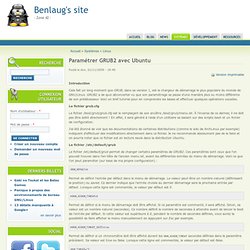
GRUB2 a de quoi déconcerter vu que son paramétrage se passe d'une manière plus ou moins différente de son prédécesseur. Voici un bref tutorial pour en comprendre les bases et effectuer quelques opérations usuelles. Le fichier grub.cfg Le fichier /boot/grub/grub.cfg est le remplaçant de son ancêtre /boot/grub/menu.lst. J'ai été étonné de voir que les documentations de certaines distributions (comme le wiki de ArchLinux par exemple) indiquent d'effectuer des modifications directement dans ce fichier. Le fichier /etc/default/grub Le fichier /etc/default/grub permet de changer certains paramètres de GRUB2. Permet de définir l'entrée par défaut dans le menu de démarrage. Permet de définir si le menu de démarrage doit être affiché. #GRUB_HIDDEN_TIMEOUT_QUIET=true GRUB_DISTRIBUTOR=`lsb_release -i -s 2> /dev/null || echo Debian` /! #! #! #! #! How to set NOMODESET and other kernel boot options in grub2. On some hardware configurations, you need to set some kernel parameters for ubuntu to boot or work properly.

A common one is nomodeset, which is needed for some graphic cards that otherwise boot in to a black screen or corrupted splash, acpi_osi= to fix lcd backlight and other problems, and noapic and nolapic to work around various ACPI BIOS issues. In this how to I will explain briefly what this is and how to do it.This how to applies to ubuntu 10.04 and 10.10. It may not apply to wubi, I dont know how to do it in wubi. (update, see post #8 for the differences with wubi)What are these options? Nomodeset The newest kernels have moved the video mode setting into the kernel. If you press the F6 key, a menu at the bottom will open allowing you to set kernel options with the space bar or enter key. GRUB2 Edit Mode. GNU GRUB MenuYour computer should automatically boot into GRUB's Menu mode if you had another operating system in the computer before you installed Ubuntu.
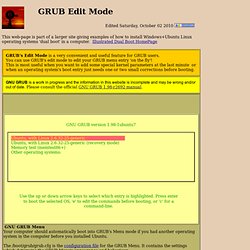
The /boot/grub/grub.cfg is the configuration file for the GRUB Menu. It contains the settings which determine the GRUB Menu's appearance and behaviour. Sometimes there's only one or two small changes you need to make in the lines from your grub.cfg before you can get your operating system to boot. GRUB's 'Edit' mode is helpful when you want to temporarily over-ride settings in your /boot/grub/grub.cfg or append something (like a kernel option), to the end of a line in a boot stanza just for one boot-up. Using 'Edit' mode can often be faster and easier than using GRUB in CLI mode. How to enter 'Edit Mode'.Press your 'e' key from your GRUB Menu to switch into 'Edit Mode'.Use your 'Esc' key to return to the GRUB menu.
Keyboard Shortcuts Links you should see: _ BootOptions - Ubuntu Community Documentation.