
Apprendre les 101 commandes indispensables sous linux. Ls liste les fichiers d'un dossier.

Pages du manuel Linux - ~tigrou/pwet.fr. (Mac) Os X. Introduction aux scripts shell - Reprenez le contrôle à l'aide de Linux ! Vous venez d'apprendre à utiliser un éditeur de texte puissant comme Vim.
Cela va vous être particulièrement utile pour les chapitres à venir. Entrons maintenant dans le vif du sujet : la programmation shell. Scripting - Mac OS X - run shell script from the desktop GUI.
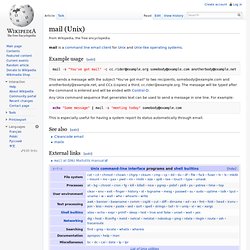
Shell debugging tools. Help (Unix commands) Mail (Unix) Mail is a command line email client for Unix and Unix-like operating systems. mail -s "You've got mail" -c cc.rider@example.org somebody@example.com anotherbody@example.net This sends a message with the subject "You've got mail" to two recipients, somebody@example.com and anotherbody@example.net, and CCs (copies) a third, cc.rider@example.org.
How to send mail from script in Linux - onlinecyberstudy. Genaral commands Unix. Command line (perl -e)
Linux and Open source Understanding Nmap Commands: In depth Tutorial with examples. Article by James Hawkins As we all know, Nmap (Network Mapper) is a stealth port scanner widely used by network security experts (including forensics & Pen-testing Experts).
In this article we’ll see the different types of Nmap Scans, its techniques, understanding the purpose and goals of each scan , its advantages or disadvantages over other scanning tools, which could be better at evading firewalls & IDS (To a certain extent) and much more. In this first part, I have made my best to explain the basic scanning techniques, Host discovery options, port scanning options, techniques used in detecting Operating system & services running on the system. i also give Nmap as already installed on your system.
Let’s start with one of the most basic and default scan, the one without using any parameters. Open up the terminal, in Ubuntu ctrl+alt +t This is a basic scan of the local IP address 192.168.1.34, we use sudo to gain administrator privileges, and then we give the target to Nmap. Kill All Processes with ps ax. Introduction Many times we write programs which runs many instances of itself, either while using fork or we manually run many copies of the same program, so during the development stage we may need to kill all running instances and modify the program and re-run, or there may be other situations where we may need to kill a ll perl programs running, etc etc.
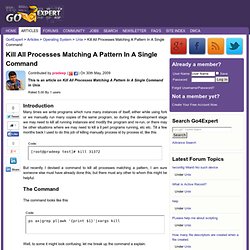
Till a few months back I used to do this job of killing manually process id by process id, like this Code: [root@pradeep test]# kill 31372 But recently I devised a command to kill all processes matching a pattern, I am sure someone else must have already done this, but there must any other to whom this might be helpful.
Chmod: Commande Chmod Linux / Unix. Xargs / for about file. I am trying to use xargs command using shell pipes and not able to understand how to control and use command line arguments. For example I’d like to find out all *.c file located in 100s of sub-directories and move them to another directory called ~/old.src. How do I use command line args with xargs to achieve the same? Xargs command is designed to construct argument lists and invoke other utility. xargs reads items from the standard input or pipes, delimited by blanks or newlines, and executes the command one or more times with any initial-arguments followed by items read from standard input.
Blank lines on the standard input are ignored. xargs is more safer and easy to use. Example uses of the Linux Command find. The following examples illustrate typical uses of the command find for finding files on a computer. find / -name game Looks for a file named "game" starting at the root directory (searching all directories including mounted filesystems).
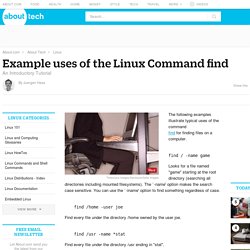
The `-name' option makes the search case sensitive. Commande - “grep” récursif. Regex - what is wrong with find . MAN LINUX en français, la documentation des commandes LINUX. Man tail - Afficher la dernière partie d'un fichier. Recherche et suppression de processus Zombie (Ubuntu 10.10 multi OS) Dans le cadre de mon activité professionnelle, mon Firefox reste longtemps lancé, bilan je me retrouve 2 jours plus tard avec beaucoup de processus zombie qui viennent augmenter le load de mon poste (je ne suis pas patient et cela me fais souvent rager) Rechercher un processus Zombie : La commande TOP, va nous permettre de retrouver pas mal d’information système, le load, les processus en cours et aussi connaitre le nombre de processus zombie.
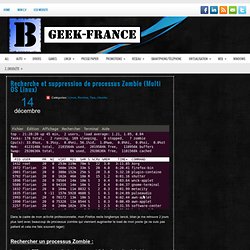
Dans l’extrait suivant on constate que mon système à 71 processus avec le status zombie, le processus est terminé mais le PID est toujours reservé. Ubuntu camorama zombie configuration. Un seul langage pour les scripts. Manpage of TUNE2FS. Tee MAN Page. Redirect output to multiple files, copies standard input to standard output and also to any files given as arguments.
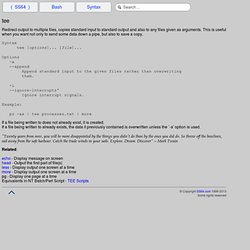
This is useful when you want not only to send some data down a pipe, but also to save a copy. Syntax tee [options]... Man tee - Copier l'entrée standard sur la sortie standard et dans un fichier. Man df - Fournit la quantité d'espace occupé des systèmes de fichiers. Df(1): report file system disk space usage. Name df - report file system disk space usage Synopsis df [OPTION]...
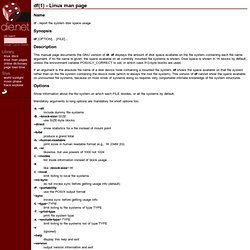
[FILE]... Linux Tutorial: The Power of the Linux Find Command. Awk. Un article de Wikipédia, l'encyclopédie libre.
Pour les articles homonymes, voir AWK. awk — dont le nom vient des trois créateurs, Alfred Aho, Peter Weinberger et Brian Kernighan — est un langage de traitement de lignes, disponible sur la plupart des systèmes Unix et sous Windows avec Cygwin ou Gawk. Il est principalement utilisé pour la manipulation de fichiers textuels pour des opérations de recherches, de remplacement et de transformations complexes.
Linux - Does scp create the target folder if it does not exist. How does `scp` differ from `rsync`? Linux – Taille d’un répertoire et sous-répertoires, gros fichiers, etc. – JBNet.fr. Man du - Statistiques sur l'utilisation du disque. / Commandes. Linux - Getting pids from ps -ef. How to use Sed substitutions—from basic to advanced. How to use Sed substitutions, from basic to advanced - Yes, I Know IT ! Ep 08. How to Write Complex Awk Patterns using Operators? Yes, I Know IT ! Ep 13. 05 Manipulating output with grep, awk, and cut. Linux chattr Command Tutorial for Beginners (5 Examples) Many a time, a Linux machine is used by different users. So there are chances that these users access a common set of files. This opens up door to problems like accidental deletion or editing of important files, something which you - as an administrator - would definitely not want to happen.
Thankfully, there exists a command - dubbed chattr - that's developed to help you in specifically these kinds of scenarios. In this tutorial, we will discuss this tool using some easy to understand examples. But before we do that, it's worth mentioning that all examples here have been tested on Ubuntu 16.04 LTS. Linux - What' the differences between `chattr +i FILE` and `chmod -w FILE`? Bash Reference Manual: Redirections. 3.6 Redirections Before a command is executed, its input and output may be using a special notation interpreted by the shell. Redirection allows commands’ file handles to be duplicated, opened, closed, made to refer to different files, and can change the files the command reads from and writes to. Redirection may also be used to modify file handles in the current shell execution environment. The following redirection operators may precede or appear anywhere within a simple command or may follow a command.
BashGuide/InputAndOutput. Input and output in Bash scripts is a complex topic, because there is a great deal of flexibility in how it's done. This chapter will only scratch the surface of what is possible. Input refers to any information that your program receives (or reads). Input to a Bash script can come from several different places: Command-line arguments (which are placed in the positional parameters) Environment variables, inherited from whatever process started the script Files Anything else a File Descriptor can point to (pipes, terminals, sockets, etc.). This will be discussed below.
Tee (command) Tee is normally used to split the output of a program so that it can be both displayed and saved in a file. The command can be used to capture intermediate output before the data is altered by another command or program. The tee command reads standard input, then writes its content to standard output. It simultaneously copies the result into the specified file(s) or variables. The syntax differs depending on the command's implementation: tee [ -a ] [ -i ] [ File ... ] Arguments: Crontab.guru - the cron schedule expression editor. Understanding UNIX / Linux File System. A conceptual understanding of file system, especially data structure and related terms will help you become a successful system administrator.
I have seen many new Linux system administrator without any clue about file system. The conceptual knowledge can be applied to restore file system in an emergency situation. What is a File? File are collection of data items stored on disk. Or, it’s device which can store the information, data, music (mp3 files), picture, movie, sound, book etc. What is a directory? Directory is group of files. Nautilus - What is the "Templates" folder in the home directory for? Understanding UNIX / Linux File System. Les commandes mount et umount. Maintenant que le système de fichiers est créé, on peut monter la partition. Elle sera vide dans un premier temps, bien sûr. La commande pour monter des systèmes de fichiers est la commande mount, et sa syntaxe est la suivante : En l'occurrence, on souhaite monter notre partition sur /mnt ou tout autre point de montage que vous aurez choisi (n'oubliez pas qu'il doit exister) ; la commande pour monter notre partition nouvellement créée est la suivante :
Les commandes à ne jamais lancer sous Linux. Amis débutants en linux, attention ce post est dangereux alors CONCENTRATION ! Je vais en effet vous apprendre les quelques commandes à ne jamais taper sur un linux en root (ou pas en root, on ne sait jamais, les mauvais karmas ça existe)… How to Convert Text to Uppercase from the Shell ? Yes, I Know IT ! Ep 17. How to move hundreds of files in no time ... using glob patterns [1/3] - Yes, I Know IT ! Ep 01. How to move hundreds of files in no time ... using the find command [2/3] - Yes, I Know IT ! Ep 02.
How to move hundreds of files in no time ... using the globstar [3/3] - Yes, I Know IT ! Ep 03. How to move hundreds of files in no time ... using the find command [2/3] - Yes, I Know IT ! Ep 02. Xargs grep have limitations.