
Activity diagram. Activity diagrams are graphical representations of workflows of stepwise activities and actions[1] with support for choice, iteration and concurrency.
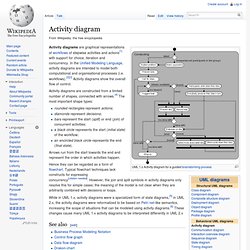
In the Unified Modeling Language, activity diagrams are intended to model both computational and organisational processes (i.e. workflows).[2][3] Activity diagrams show the overall flow of control. Activity diagrams are constructed from a limited number of shapes, connected with arrows.[4] The most important shape types: rounded rectangles represent actions;diamonds represent decisions;bars represent the start (split) or end (join) of concurrent activities;a black circle represents the start (initial state) of the workflow;an encircled black circle represents the end (final state). Arrows run from the start towards the end and represent the order in which activities happen. Hence they can be regarded as a form of flowchart.
See also[edit] References[edit] Jump up ^ Glossary of Key Terms at McGraw-hill.com. External links[edit] Supported Operations in Amazon DynamoDB. To work with tables and items, Amazon DynamoDB offers the following set of operations: DynamoDB provides operations to create, update and delete tables.

After the table is created, you can use the UpdateTable operation to increase or decrease a table's provisioned throughput. DynamoDB also supports an operation to retrieve table information (the DescribeTable operation) including the current status of the table, the primary key, and when the table was created. The ListTables operation enables you to get a list of tables in your account in the region of the endpoint you are using to communicate with DynamoDB. For more information, see Working with Tables. Item operations enable you to add, update and delete items from a table. DynamoDB provides an operation to retrieve a single item (GetItem) or multiple items (BatchGetItem).
C# - Range key with a timestamp. Query and pagination with DynamoDB. Nosql - How to structure a DynamoDB database to allow queries for trending posts. Possible to get DynamoDB assigned write. I understand that eventually consistent reads will eventually return the last written value, but, when I do a read, is there any way to tell when the value was actually written?

I'd like to get the timestamp that DynamoDB assigned to a value when I read the value. Is this possible? Put another way, I can read "CreationDateTime" information about my table; can I get similar information for data items that I read? This is relevant because, if I want to figure out which of two versions of a data item made by two different clients will be chosen as the winner by DynamoDB, I need to know what timestamp DynamoDB chose for each write. It's not sufficient to supply my own timestamps as a part of my schema because I can't control request latencies and DynamoDB may choose a different timestamp ordering than I choose. edit: I can set my own timestamp using the HTTP API; can I do something similar in, say, the Java library?
A Tour of Amazon's DynamoDB. Amazon's recent release of DynamoDB, a database whose name is inspired by Dynamo, the key-value database the distributed datastore they've been running in production for a good five to six years now.

I think it's great they've finally done it, though from my obverservations, there's little resemblance of what the original Dynamo paper describes, but I'm getting ahead of myself. Traditionally Amazon hasn't been very open about how they implement their services, so some of what I'm stating here may be nothing more than an educated guess. Either way, the result is pretty neat. Time to take a good look at what it has to offer, how that works out in code, and to make some wild guesses as to what's happening under the covers. I'm using fog's master to talk to DynamoDB in the examples below, but the official Ruby SDK also works. People.csail.mit.edu/haitham/Papers/QuickSync-mobicom.pdf. IFTTT: How could ifttt.com be improved. Projects. What Makes User Interface Intuitive. Everyone who deals with design or designing, faces the term Intuitive pretty constantly.

But seriously how can the Interface be intuitive, this “trait” can’t be referred to the soulless/brainless “thing”. The word intuitive derived from the “Intuition” human-only ability to acquire knowledge without inference or the use of reason. Intuitiveness of the interface depends much on how deep the knowledge of a person is. We are not going to offend anyone but everyone possesses different knowledge, skills, abilities, motivation, interests, values, beliefs and cognitive styles. Depending on the amount of knowledge one has, the easier it is for him to figure out “how stuff works”.
A successful user interface is one that is transparent to the user. A good example is when user change his smartphone. In UI design mental model is a representation of something (real world, device, software etc.) that user has on mind. Todd Humphreys: How to fool a GPS.