
Building GTK apps for MS Windows on Linux. Contents Cross-compiler and binutilsWin32 APIGTK API for win32GTK pkgconfig filesConfiguring and building sources for win32DLL-building magicSimple makefile exampleGTK runtime filesMessage catalogsCreating a self-installing exe Introduction The intended readership for this page is those who are already quite comfortable with building GTK-based software on Linux (who know their way around the various tools), and who wish to prepare win32 versions of their programs without having to mess with that Other OS themselves.

I don't have time at present to write a full, coherent HOWTO. What you'll find here are various ideas, tips and examples in a fairly raw state. Since some elements below may date fairly quickly, I should say that I'm writing this in early October, 2004. Cross-compiler and binutils Your first requirement is a cross-compiler and an appropriate set of binutils (as, ld and friends). Now you need to decide on a location for your cross system. . #! #! Or something like that. Win32 API #! #! GUI Building With GTK. While developing the GIMP (GNU Image Manipulation Program) a few years back, Spencer Kimball and Peter Mattis decided that it might be fun to write a user interface toolkit to go along with it.

And so they created GTK+ (the GIMP Toolkit) -- a library of "widgets" that makes it easier for developers to build GUI-based application. A widget is one of the various components of a graphical application; a toolbar, for example. The widgets provide programmers with pre-built dialog boxes, windows, menu bars and other GUI components. Having a pre-built foundation for these user interface components greatly speeds development of GUI applications and also enables applications built with those widgets to share a common "look and feel". While developing the GIMP (GNU Image Manipulation Program) a few years back, Spencer Kimball and Peter Mattis decided that it might be fun to write a user interface toolkit to go along with it. Container Widgets Some widgets can act as containers for other widgets. First programs in GTK+ HomeContents In this part of the GTK+ programming tutorial, we will create our first programs in GTK+ Simple example We start with a very simple example.
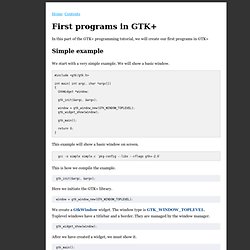
We will show a basic window. #include <gtk/gtk.h> int main( int argc, char *argv[]) { GtkWidget *window; gtk_init(&argc, &argv); window = gtk_window_new(GTK_WINDOW_TOPLEVEL); gtk_widget_show(window); gtk_main(); return 0; } This example will show a basic window on screen. gcc -o simple simple.c `pkg-config --libs --cflags gtk+-2.0` This is how we compile the example. gtk_init(&argc, &argv); Here we initiate the GTK+ library. window = gtk_window_new(GTK_WINDOW_TOPLEVEL); We create a GtkWindow widget.
Gtk_widget_show(window); After we have created a widget, we must show it. gtk_main(); This code enters the GTK+ main loop. Figure: Simple Centering the window If we do not position the window ourselves, the window manager will position it for us. In our example, we center the window, set a title and size for the window. This code centers the window.