
Web Application Security Penetration Testing. WordPress Plugin Bootcamp Part 1 – Getting Started. WordPress plugins are big, and for good reason. Not only are they incredibly useful, they also are an excellent way to gain publicity and the real powerhouse of WordPress’ flexibility and customizability. A good plugin can really make a difference, and there’s no reason why you can’t get in on it and learn to write your own. This week, we’re going to be going all the way from the ground floor to the complex ins and outs of advanced WordPress plugin development. Are you ready? Let’s Go! To get the most out of the tutorials I’ll be posting this week, it would probably be best if you have a few things at hand so that you can follow along and learn by doing. A WordPress test environment – whether that’s local or on your server is up to youA good IDE and FTP client – check out 10 Apps for Developers on a Shoestring BudgetA basic understanding of PHP – don’t worry if you’re a beginner, but it helps to at least understand the syntax.
Speeding Up WordPress: all about web performance. 83 Awesome Firefox Add-ons every Web Designer must have! FireQuery. Bien débuter avec la conception de plugins jQuery. L’un des sujets récurents de ce blog est la création de plugins jQuery.
Ces plugins sont toujours construit selon le même principe. Je ne peux malheureusement pas répéter les mêmes explications à longueur d’articles pour ne pas les rendre encore plus longs et répétitifs. Pourtant, je ne peux pas non plus aborder la conception d’un plugin sans en développer les bases. Cet article aborde, une bonne fois pour toutes, le B-A BA du développement orienté jQuery.
Les plugins jQuery permettent d’agencer le code afin qu’il soit rapidement et facilement réutilisé. $('div, #id, .class').myPlugin(); Le plugin myPlugin() s’appliquera à tous les éléments précisés par le sélecteur, ici les div, l’élement portant l’identifiant id ou la classe .class. . $.fn.myPlugin = function() {} Ou sous forme de fonctions d’utilisation plus globale. $.myFunction = function() {} jQuery.fn.myPlugin = function() {}
Contacter les commentateurs de votre blog ! sur Geekeries.fr. 10 Wordpress Plugins Guaranteed to Save You Time. In these days of the ever-increasing competitive world of the web, time is as valuable as money.
To be noticed, and to stay at the top of the game, content writers must post a lot of content on a regular basis. To keep up with time constraints, WordPress plugin authors provide an array of useful plugins that will drastically reduce the time required to write, format, and post your content. In this article, you’ll find 10 excellent WordPress plugins intended to reduce and simplify tasks associated with blogging so that you can spend more time creating content, and less time with site administration. 1.
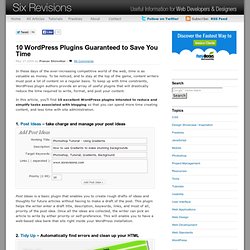
Post Ideas – take charge and manage your post ideas Post Ideas is a basic plugin that enables you to create rough drafts of ideas and thoughts for future articles without having to make a draft of the post. 2. Tidy Up is a port of HTML Tidy into WordPress. One Library, One Site. 20 Tutorials to Develop Wordpress Plugin. WordPress plugin developers are earning good amount online.
Most of them release two versions of plugin, one is free version and other is premium with some enhanced features. If you are new to plugin development or want to extend your experience this article is best for you. WordPress has become more important application for bloggers and even for those who need small web site. To extend its functionality beyond the basic features there are too many plugins. You can do almost anything with WordPress using different plugins. I have compiled 20 tutorials for developers to know how to develop wordpress plugin. 1. Here it is, a video guide to creating your first WordPress plugin (in under 5 minutes!). First WP Plugin. WordPress Developer's Toolbox. Augmenter la sécurité de Wordpress à l’aide de 10 plugins.
Télécharger le plugin wordpress Sociable en français. Twitter Tools: Integrate Twitter with WordPress. I’ve had my Twitter account for about a year, now, but I didn’t really “get it” at first – mostly because there weren’t very many tweeps (twitter/peeps) on there that I cared to tweet to, or with. It wasn’t until November that I saw more and more tweeps that I knew, thus Twitter became a staple in my ever-growing social media disorder. If you are not familiar with Twitter, I would describe it as an online group short messaging service.
Basically, you can write messages using up to 140 characters, and those who follow you will be able to see your messages and reply… and vice a versa. So, it’s really like group text messaging… online… and on your phone. Reading through their FAQ page, it seems like Twitter was initially planned primarily for use through your cell phone text messaging service, but (while many do use Twitter through their cellys) I feel like things have moved more toward the web. Un semblant d’interactivité dans la suggestion de liens. Certains plugins ont vraiment la cote, et de petites modifications peuvent apporter un « plus » à leur fonction fort pratique.

Google Docs Tools To Increase Your Productivity. Interface elements for jQuery - About Interface.