
HTML5 game tutorial - Make a snake game using HTML5 canvas and Jquery. Create a Mobile HTML5 RPG - Tutorial. Don't forget to check out my online course HTML5 Mobile Game Development for Beginners.
Get 90% OFF!. Only until the end of the month. Intro In this tutorial, I'll show you how to create a (very) simple RPG demo that works in all HTML5 supporting platforms, using the Open Source Javascript framework LimeJS. This framework allows you to quickly create simple games that work regardless of the screen resolution of your device (laptop, phone, tv). RPG Games What is the most important aspect of an RPG game? WorldCharactersMonstersStory We will thus cover these items, except for the "Story" one, as it's really up to you to come up with something exciting. Tutorial requirements Basic HTML and Javascript knowledgeBasic notions of Object Oriented programmingA text editor or IDE to create and edit codeSome love for RPG games!
Creating a Simple Windows 8 Game with JavaScript: Windows 8 App Basics. “Shall We Make a Game?”

This is the first in a series of four posts over four weeks that will show you how to create a (very) simple Windows 8 game. We’ll be using HTML5, JavaScript, WinJS, and some helpful libraries from CreateJS along the way. The game is based on the XNA sample game “Catapult Wars Lab”. We’ll reuse the assets from that game as we develop a new version for Windows 8 that’s based on web technologies. This game focuses on simplicity, so there are a number of intermediate techniques that aren’t used in this sample. Let’s get started. Setting Up To develop this game (or any Windows 8 Metro style application) you need to have both Windows 8 and Visual Studio 2012. Creating the Project Start Visual Studio 2012 and choose FILE -> New Project (or CTRL + SHIFT + N). Name the project “CatapultGame” and click OK to reate the project.
Understanding the Project So, what did we get? Here are the main parts to focus on: Running the Game… well, the Empty Project. Game Starterkit for Windows 8 with leaderboard in Windows Azure. This Game Starter Kit for Windows 8 contains what you need to get started with game programming for Windows 8, including online high score in Windows Azure.

The game kit is written in HTML and JavaScript. Download now – follow instructions below to make it work. Before we start, let me show you what you get with this solution. Create a Mobile HTML5 Farming Game - Tutorial. Don't forget to check out my online course HTML5 Mobile Game Development for Beginners.

Get 90% OFF!. Only until the end of the month. Intro Over the last few years, HTML5 has come out as a great alternative to develop cross-platform app using a single code base. A HTML5 app can run on iOS, Android, Windows Mobile, Blackberry.. and of course good old Desktop. For amateurs and professional developers it's quite easy to get started with HTML5 (which comprises HTML, CSS and Javascript) as all you need is a text editor and a web browser. In this tutorial you'll learn the basics on how to create a simple farming game that emulates those big hits you've played on Facebook. Tutorial requirements Basic HTML and Javascript knowledgeBasic notions of Object Oriented ProgrammingA text editor or IDE to create and edit code (I recommend Netbeans)A terminal to run commands Farming Games? Farming games are a big phenomena that knows no limits when it comes to nationalities and generations.
Gaming: Battle on the High Seas, Part 1. Web browsers supporting HTML5′s Audio, Canvas, and Web Storage APIs are an exciting gaming platform.

These APIs can be used to create interesting games with money-making potential. As a demonstration, this article begins a five-part HTML5 game development series focused on a simple SeaBattle game. Part 1 introduces SeaBattle, shows how to embed it in a Web page, and overviews its architecture. The game presented here has been tested in Chrome, Firefox, Internet Explorer 9, Opera 12, and Safari 5 desktop browsers. Introducing SeaBattle Years ago, I played a game in which a destroyer and multiple submarines engage in battle. Figure 1: The title screen introduces SeaBattle. Quintus JavaScript HTML5 Game Engine. A platfomer in ~80 lines of code, you can edit the code on the left.
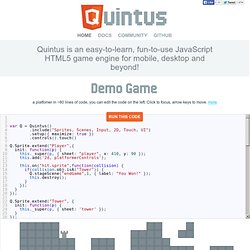
Click to focus, arrow keys to move. more A breakdown of the example is below. Create an HTML file, pull in the Quintus library and setup the engine. Quintus has a modular engine that lets you pull in just the modules you need and can run in multiple instances on a page. <html><head><script src=' var Q = Quintus() .include("Sprites, Scenes, Input, 2D, Touch, UI") .setup() .controls() .touch(); </script></body></html> Quintus supports an event-based, hybrid Object-Oriented and Component-based approach, allowing for both a standard inheritance model with support for reusable components.
Quintus let's you easily create reusable scenes that can be swapped in and out by loading them onto stages. Quintus features easy asset loading, sprite sheet generation.