
Home. Webs 3.0 Support Center. Box-shadow, one of CSS3′s best new features. Home / CSS3 Previews / Box-shadow, one of CSS3’s best new features The box-shadow property allows designers to easily implement multiple drop shadows (outer or inner) on box elements, specifying values for color, size, blur and offset.
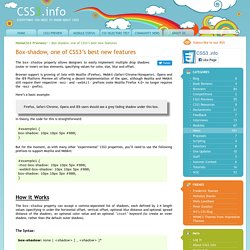
Browser support is growing of late with Mozilla (Firefox), Webkit (Safari/Chrome/Konqueror), Opera and the IE9 Platform Preview all offering a decent implementation of the spec, although Mozilla and Webkit still require their respective -moz- and -webkit- prefixes (note Mozilla Firefox 4.0+ no longer requires the -moz- prefix). Here’s a basic example: Firefox, Safari/Chrome, Opera and IE9 users should see a grey fading shadow under this box. Box-shadow, one of CSS3′s best new features. Hot off the Press: Free High Quality Hand Drawn Fonts. Let’s welcome the latest trend in the web design field especially in terms of typography , the new Hand drawn fonts.
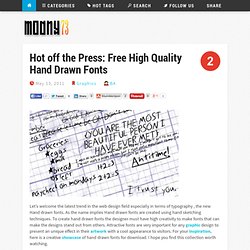
As the name implies Hand drawn fonts are created using hand sketching techniques. To create hand drawn fonts the designer must have high creativity to make fonts that can make the designs stand out from others. Attractive fonts are very important for any graphic design to present an unique effect in their artwork with a cool appearance to visitors. For your Inspiration, here is a creative showcase of hand drawn fonts for download. I hope you find this collection worth watching. A font is all the letters, numbers, punctuation and other symbols which compose a typeface. Handwriting fonts are subject to the same rules as regular fonts when it comes to font size. Welcome to Antz Media. Web Master Tools. Web Designers Network on G+ Home page. Flavors.me : The Digital You.
FPCVirtual.
Useful HTML5 & CSS3 Toolbox For Web Developers. CSS How to. Online Web Tutorials. 20 Elegant Fonts for Clean Design. How To Make Image To Highlight When It`s Mouseovered - Discuss Anything. HTML Code Tutorial - Free Reference Guide for Help with HTML Tags Including Form, Frames, Tables, and more! Links from everyone - Forrst. Header re-redesign Laura Moraiti A few new iterations on the mobile navigation, thanks to @Oiseau and @kenil for their input 1.a) Centered logo, with "Top read" and "Search" on the sides as easy access and a 100% width "Menu" button that activates a dropdown.
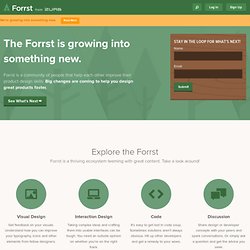
The dropdown features the main categories in a column with associated color and then the other items with their icon (in larger size) 1.b) The same but using all caps. Free video chat API and Widgets. Live video apps for your site or blog. A suite of advanced capabilities that power real-time communication for your websites and apps.

Record, archive, and access every OpenTok session. OpenTok’s Archiving API makes it easy to record your OpenTok sessions. JavaScript, sending parameters to a web page. How to pass parameters to a web page?
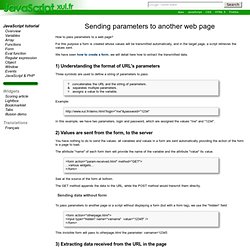
For this purpose a form is created whose values will be transmitted automatically, and in the target page, a script retrieves the values sent. We have seen how to create a form, we will detail here how to extract the transmitted data. 1) Understanding the format of URL's parameters Three symbols are used to define a string of parameters to pass: 9 HTML5 Features that will make our UI code cleaner by removing lot of Javascript. HTML5 Specs are out and all the leading browsers are making sure that they are compatible with it.
As a web developer, we always need a lot of javascript for HTML form validation. I like some of these features that will reduce the javascript functions in the web page and make our page load faster. 1. <input type=”number”><input type=”tel”> Most of the web forms these days have zip code and mobile numbers field and to avoid user entering wrong values, javascript is required to either validate the field value on form submit or restrict the users to enter only numbers in the text field.
Web Design & Book Marketing. Pressed, Beveled, Shadows, Intented Borders. Pressed, Beveled, Shadows, Intented Borders. Design Bombs CSS GALLERY - Web Gallery & Web Design Resources, Tutorials, Online Community, CSS, jQuery, Mootools, Photoshop, Illustrator, and more. Graphic Design Inspiration - Tutorials & Web Design Resources. Author Media. Top 10 Most Useful Typography Tools To Save Designers Time And Effort.
Typography is one of the most important aspect of design that uses text as their main element.
Typography got the power to make any website design or graphic design attractive and lively. If you have noticed from quite a long time, there are many websites running that have great example of typography designs. Most of the times, graphic designers and web designers are pretty overwhelmed by the huge collection of fonts available on the Internet. However, there are many typography tools available freely on the Internet that are useful and make designers life easier. With the use of such typography tools, you can easily create awesome designs with different color, fonts, attribute etc. Html5 Apps. 30 Professional Free Fonts for Excellent Typography. In this article we want to present 30 Professional Free Fonts for Excellent Typography you should consider using for your designs or typography works.
Make sure you maintain records of where fonts were acquired and keep the original archive file with the legal terms to prove permission of use. Cam to Cam Video Chat for Free. HTML5: The Basics (1 of 4) The next iteration of HTML has been met with excitement by some, loathing by others and confusion/fear by everyone else.
Love it or hate it, HTML 5 will soon define how you build websites. This is the first article in a four part series that will introduce HTML5 and its basic features as well as explain the key differences from HTML4.01 and XHTML 1.0 so you can start preparing yourself and your sites for the transition. Over the next week we’ll be focusing on three major areas: Treehouse. CodeDevelopr.