
Google Wave: A Complete Guide. Last updated: January 29th, 2010 Today has been dominated by news and excitement surrounding Google Wave, Google's new real-time communication platform that will launch to the public on September 30th.
In fact, there's been so much buzz that you might just not have enough time to read the thousands of articles being released on Google's biggest product launch in recent memory. To make sense of it all, we have compiled key information, definitions, and links related to the launch of Google Wave. This in-depth guide provides an overview of Google Wave, discusses the terminology associated with it, details information on Google Wave applications, (i.e. the Twitter Wave app Twave), and goes over ways to keep yourself informed. We know you're excited about Google Wave, so here's what we think you should know: What is Google Wave?
Google Wave has a lot of innovative features, but here are just a few: Google Wave was the brainchild of a team based out of Sydney, Australia. Terminology. Linked Data vs. Google Fusion Tables. Wouldn't it be cool if you had an idea for a collection of data and there was a way you could set up the database and then invite people to contribute data to the collection, visualize the collection, re-use the collection, and link it to other collections of data?

I think it's really cool, and its also the idea behind Linked Open Data, an initiative of the W3C's semantic web activity. The Linked Data people have amassed an impressive array of datasets available in the RDF xml format, and by using a foundation of URIs as global identifiers, they've enabled these datasets to be linked together.
I've been reading a really good explanation of how to publish linked data. But you know what? I have never actually made any data collections available via linked open data. This morning, I set up an online database for twitter conference hashtags, using the data I collected for my last posting about conference hashtags. Pre-alpha is a good description. Google Visualization API Wrapper. This page is about a library I made for the Google Visualization API . Get all the details at your own reading pace, or jump straight to the source code and the examples . Sometime ago, Google released their Visualization API that lets users take structured data from a variety of sources (regular user-provided data, a Google spreadsheet or as a gadget ) and create interactive visualizations and reporting applications.
I have been using MotionChart for a while now, it is a beautifully crafted visualization tool, but at the same time, the code required to generate the chart is quite repetitive and unnecessarily complicated. Not exactly in line with the simplicity mantra Google is known for. Creating A Google Wave Extension In 5 Steps. This is a simple to follow tutorial on how to create an extension that other Google Wave users can install and use in their waves.

We will create a simple gadget extension that will list some blog names and when the user clicks on a name, the latest posts from the blog selected will be displayed in the wave. Yes, we will create a feed reader to use in Google’s waves :) Step 1: Create the interface The first thing we need to do is to wireframe our application. Our gadget should be easy to use and most of the time it will be loaded in less than 500px in width. The HTML code needed to create the layout above is (File: gadget.php): and the CSS (File: styles.css): Don’t worry about CSS3 code above. Step 2: The behavior We would like to use AJAX to load each feed in our application but xmlhttprequests don’t work cross domain. Now, each time any of the links is clicked, our JavaScript will ask the server for the feed and display it in the “feed” div layer. Step 3: Server Side Step 4: Gadgetize it.
Google Search Operators. The following table lists the search operators that work with each Google search service.
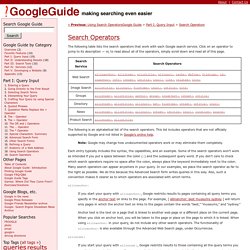
Click on an operator to jump to its description — or, to read about all of the operators, simply scroll down and read all of this page. The following is an alphabetical list of the search operators. This list includes operators that are not officially supported by Google and not listed in Google’s online help. Each entry typically includes the syntax, the capabilities, and an example. Some of the search operators won’t work as intended if you put a space between the colon (:) and the subsequent query word. Allinanchor: If you start your query with allinanchor:, Google restricts results to pages containing all query terms you specify in the anchor text on links to the page.
Anchor text is the text on a page that is linked to another web page or a different place on the current page. Allintext: allintitle: allinurl: In URLs, words are often run together.