
Ms-windows-explorer. Firefox_stuff. How to manipulate windows quick. Msconfig. How to keep Windows up to date quickly. How to reinstall Windows and outfit your system with all freewar. I recently clean installed Windows XP on my laptop, and this meant that I had to re-install all the essential software that I use.

It also presented an opportunity to write a posting about how you can outfit your computer with all the essential (and non-essential) software you need using strictly 100% freeware and/or open source titles.This posting could have been titled any of the following: Pre-installation: before reformatting my hard drive, I used the following programs: Installation: re-installed Windows XP on the re-formatted primary partition. Used the CD that came with my laptop to install all the proper drivers without hitch. If you have drivers issues try to find the drivers you need on the internet and, if not 100% successful, use the ones from the DriverMax backup (#4 above).
Post installation: now the fun begins. RapidTyping. UpdateStar. Power Calculator. IrfanView. Skype. Vous pouvez faire tant de choses avec Skype : raconter une histoire pour s'endormir, tenir une réunion ou prendre un cours de langue… Voici quelques-uns des avantages dont vous pouvez bénéficier : appels gratuits entre utilisateurs Skype ;appels économiques vers des lignes fixes et mobiles, et SMS à tarif avantageux ;appels vidéo sur Skype et Facebook ;messagerie instantanée avec votre famille, vos amis et vos collèguesenvoi de messages véritablement différents avec la messagerie vidéo.
QT ToolBar. DeleteOnClick. jZip. A weakness I find in MOST windows-based compression/archiving utilities: long paths.

NTFS can support up to 32,000 character-long pathnames. But almost every tool you use to read, write, or access files on an NTFS volume (including all the DOS tools, dir, type, etc. and including the windows shell, Explorer, etc.) will fail, because they're coded for ANSI paths - which are limited to something like 260. So if you try to make archives or zipfiles of data stored in directories with meaningfully descriptive names, you will soon encounter this problem. Worse still; different tools respond differently to the problem. Some tools will simply skip files with long pathnames. QuickLogger 2.
CD Art Display. SharePod. Filezilla 3.0. Remove Empty Directories. 7-Zip. Eraser. Stop!
Don't sell that old hard drive. You wouldn't believe how much personal information may still be on it! Passwords, bank account information, love letters, they may still be recoverable even after you "erase" and reformat the disk. Follow the jump for more information...and a solution. The BBC reports that eBay vendors are taking risks when selling used data storage devices. Many people are taking risks with data on hard drives and memory cards which they are selling via eBay, say experts. The solution? Download a free copy of Eraser and erase your hard drive before you eBay it. Eraser is a tiny program. CCleaner. Revo Uninstaller. Launchy. NetStumbler. TeraCopy. Power replacements for built-in Windows utilities. CD Recovery Toolbox : Recover Files from Damaged CDs and DVDs. TreeSize. VLC Media Player. MyUninstaller. KIT. PortableApps.com.
Windows Installer CleanUp Utility. JkDefrag GUI. Windows Explorer replacements abound. If you're an advanced Windows user, you've probably developed a serious hate for Windows Explorer, the built in file management tool.
It's weak, it lacks advanced features and most users don't realize it can be replaced. Lifehacker recently took a long hard look at Xplorer², a tabbed and efficient alternative with a slew of keyboard shortcuts. Xplorer² is definitely worth a look but, if that doesn't tickle your fantasy, here's a short list of other alternatives. XYPlorer - XYplorer is a multi-tabbed file manager for Windows, featuring a very powerful file search, versatile preview facilities, a highly customizable interface, and a large array of unique ways to efficiently automate frequently recurring tasks. Free trial available, a license will cost you $29.50. Swept Away. Hear when you hit Caps Lock. Xplorer2. Xplorer2 file manager. I've played with explorer replacements before, but none of them have been up to snuff.
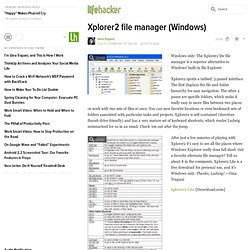
Maybe it has been the clunky interfaces, the lack of remaining explorer integration (do I really need another button on my start bar?) , or disturbingly sluggish performance; more likely though I'm just too impatient to learn them. Despite my past trials I thought I'd give xplorer2 a shot. Dead easy install, always nice; straight forward configuration and customization, always nicer; scraps, brilliant, and here's one of many reasons why: I've got a directory structure that starts at c:\active and runs 3 folders down before you hit anything of substance, 5 or 6 down for the heart of the beast.
The goal: get local copies of all the remote documentation. LetMeType. Texter. Switch Windows with Launchy and the Go Y Plug In. FindeXer and PlacesBar Editor. EverNote 2.0. Flash renamer : change folder and file names in bulk. Website copier.