rememberthemilk

TwitterFacebook
Get flash to fully experience Pearltrees
apple_mac_widget

quicksilver

gtd_app

http://blog.rememberthemilk.com/2009/11/add-remember-the-milk-to-your-google-calendar-sidebar/ It's no secret that we're big gadget fans here. Waaay back in 2006, we launched a feature that enabled you to add a daily gadget to Google Calendar : clicking on a checkmark icon would bring up your tasks for that day. The problem with that daily gadget is that it requires clicking to see your tasks (and everybody knows that the more work required to get to your tasks, the less likely it is that they'll get done!).
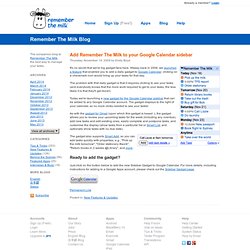
How to add Remember The Milk to your Google Calendar sidebar

App for the milk

App for the milk is a desktop client for the remember the milk webservice that lets you quickly manage your tasks from your desktop even when you are offline and sync the next time you are connected to the internet. http://www.chrillo.info/apps/app-for-the-milk/
http://blog.rememberthemilk.com/2009/09/introducing-smart-add-a-smarter-way-to-add-your-tasks/

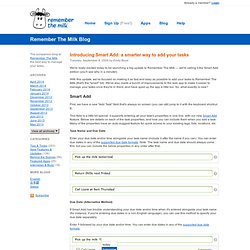
Introducing Smart Add: a smarter way to add your tasks in Rememb

Tuesday, September 8, 2009 by Emily Boyd We're really excited today to be launching a big update to Remember The Milk — we're calling it the Smart Add edition (you'll see why in a minute!). With this update, we've focused on making it as fast and easy as possible to add your tasks to Remember The Milk (that's the "smart" bit). We've also made a bunch of improvements to the web app to make it easier to manage your tasks once they're in there, and have sped up the app a little too. So, what exactly is new? This field is a little bit special: it supports entering all your task's properties in one line, with our new Smart Add feature.
Lifehacker is making some changes to its comment system that will require you to log in with a Facebook, Google, or Twitter account. You must convert your account to one of these services in order to continue using your account. Converting your account on Lifehacker will do so on all Gawker Media Sites. http://lifehacker.com/5060107/rtm-notifier-puts-remember-the-milk-alerts-on-your-desktop

RTM Notifier

Remember the Task

http://lifehacker.com/5113035/remember-the-task-puts-remember-the-milk-in-a-stand+alone-window Windows/Mac/Linux: Remember the Task simply puts web task manager Remember the Milk's familiar gadget interface into a stand-alone Adobe AIR window, but maybe that's just what you need. RTM's stripped-down, vertically-aligned rectangle is the same you'll see in its Gmail and iGoogle gadgets, as well as a Vista Sidebar widget and desktop embeds . But since Remember the Task is its own desktop window, you can minimize it to your tray , keep it on your second monitor, or simply have it available by hitting Alt-Tab.
Description Take your to-do list anywhere with this feature-packed app; never forget the milk (or anything else) again. Remember The Milk (RTM) for iPhone, iPod touch and iPad connects with the popular online service of the same name. With millions of users worldwide, Remember The Milk is everywhere you are: from mobile to the web to apps including Outlook, iCal, Gmail, Google Calendar, Twitter, and more.

Remember the Milk

http://itunes.apple.com/us/app/remember-the-milk/id293561396?mt=8
http://www.rememberthemilk.com/services/googlecalendar/ New! Remember The Milk for Google Calendar (Sidebar Gadget) This gadget can be added to any Google Calendar account, giving convenient access to your tasks alongside your calendar. Review your upcoming tasks for the week (including any overdue), add new tasks and edit existing ones, easily complete and postpone tasks, and customise the display. Remember The Milk for Google Calendar (Daily Gadget) This gadget adds a small task icon to the top of each day in Google Calendar.

How to use Remember The Milk for Google Calendar

How to use Remember The Milk for Twitter

Twitter is a popular micro-blogging service that allows you to send updates (up to 140 characters in length) via SMS, IM, the website, and third-party applications . It also has a handy feature which allows you to send direct (private) messages to your friends on Twitter. Add rtm as your friend, and you can add and interact with your tasks by direct message (and get reminders too!). Read on to learn more. Getting started http://www.rememberthemilk.com/services/twitter/
Remember The Milk for Gmail Browser Add-on This browser add-on or extension allows you to manage your tasks in Gmail, add new tasks (and connect them with your emails, contacts, and Google Calendar events), automatically add tasks for starred messages or specific labels, and much more! Remember The Milk Gadget for Gmail Labs This gadget can be added to any Gmail account, giving convenient access to your tasks alongside your email. Review your upcoming tasks for the week (including any overdue), add new tasks and edit existing ones, easily complete and postpone tasks, and customise the display. http://www.rememberthemilk.com/services/gmail/

Remember The Milk