
Star Ratings With Very Little CSS. Star ratings are one of those classic UX patterns that everyone has tinkered with at one time or another.
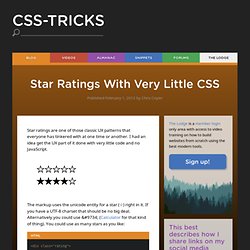
I had an idea get the UX part of it done with very little code and no JavaScript. The markup uses the unicode entity for a star (☆) right in it. HTML5 Cheat sheets. W3C : HTML5 sera terminé en 2014. Progressively Enhancing HTML5 Forms. Published by Chris Coyier This is what I'm thinking is the best current way to progressively enhance forms. That is, use HTML5 features when they are available and fall back to JavaScript alternatives when they are not. Load up Yepnope.js Yepnope is a "script loader" which will load scripts conditionally. AwesomeChartJS. Description AwesomeChartJS is a simple Javascript library that can be used to create charts based on the HTML 5 canvas element.
The main goal during development was to pick sane defaults in order to let the user create simple charts quickly with just a couple of lines of code. One can create at almost no time bar, pie, doughnut and Pareto charts. NOTE: If you are interested in a far more advanced, interactive JavaScript plotting library, take a look at Flot. LimeJS HTML5 Game Framework. HTML5 Boilerplate - A rock-solid default template for HTML5 awesome. Pressed Button State With CSS. NOTE: I’ve covered button link styling using CSS3 in a more recent post which you can read here.
The following post is an older method using images. There is certain anchor state in CSS that I don’t see used very often — actually, it’s something I haven’t really used myself, but something which I now realize can be very useful. I’m talking about the “active” anchor state. The active anchor state is the state an anchor (a link) is in when you click on it. The moment you click on a link, it becomes active. You see, on the desktop, whether on Windows, Linux or OS X, the buttons respond to you when you click on them. On the web, such feedback is seldom given. It doesn’t have to be this way. Animated HTML5 logo - K3D demo using HTML5 Canvas and JavaScript (no Flash) 10 Principles for Keeping Your Programming Code Clean.
A common issue in almost every profession that can drive people completely insane is having to continue from what somebody else started.

The main reason for this being the fact that everyone has different ways of working, and sometimes these self-induced habits can be just downright messy. In order to make code look cleaner, and thus, support team work (meaning that somebody else might need to work with what was coded before), there are certain considerations that should be taken into account. BlueGriffon — Un éditeur HTML5 & CSS3 WYSIWYG avec des morceaux de Firefox. #dt Blog on deviantART: IE9 Tries to Implement HTML5 - Hilarity Ensues. National Museum of China. HTML5 drag-and-drop upload comes to Google Docs. Nudity detection with JavaScript and HTMLCanvas. Nude.js is a JavaScript implementation of a nudity scanner based on approaches from research papers.

HTMLCanvas makes it possible to analyse image data and return whether it's nude or not. The script only detects nudity, the rest of the programming logic (image swap/auto-save ;-) /whatever) belongs to the programmer.Update: First improvements and next steps of nude.js (Article) The real world usage for client side nudity detection could be in webproxies with child security filters, and maybe even more (e.g. on social media plattforms) nude.js is Open Source and definitely not finished (lots of improvements to do).Contributions are very welcome, the goal is to build a reliable client-side nudity scanner. Visit nude.js on GitHub or download the sourcecode right here. Bakemono - a monster brought to life using the HTML5 canvas. 3D Cube using 2D CSS transformations – Paul R. Hayes. The impression of a three dimensional cube can be created using modern CSS techniques, without the need for JavaScript, imagery, canvas or SVG.
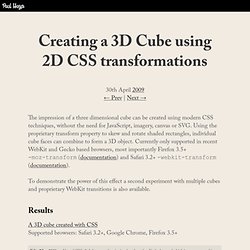
Using the proprietary transform property to skew and rotate shaded rectangles, individual cube faces can combine to form a 3D object. Currently only supported in recent WebKit and Gecko based browsers, most importantly Firefox 3.5+ -moz-transform (documentation) and Safari 3.2+ -webkit-transform (documentation). To demonstrate the power of this effect a second experiment with multiple cubes and proprietary WebKit transitions is also available. Results A 3D cube created with CSS Supported browsers: Safari 3.2+, Google Chrome, Firefox 3.5+ Altered CSS slightly to use skew(x,y) rather than skewY, the latter of which is not supported in Safari 3 / Chrome. Untitled. CSS3 - Information and samples - robertnyman.com. Creating Your Own Accessible HTML5 Media Player.
Animation Using CSS Transforms < CSS. Tweet363 Shares Share0 Tweets37 Comments The examples on this page will work now in Firefox, Safari, Chrome, Opera and Internet Explorer 10.

In older browsers you will see either no effects, or the transforms taking place without any animation. The animations presented below involve setting up a transformation to take place in response to a mouseover or other event. Then, rather than applying the effect instantly, we assign a transition timing function which causes the transformation to take place incrementally over a set time period. There are also other kinds of animation available, including @keyframes for perpetual motion, and requestAnimationFrame which gives complete control over the timing and path. Twevelopers : Via @geekarlier - Créer un jeu (ou appli dynamique) avec #HTML5 #Canvas et #Javascript : Cloth Simulation. A little more detail: What makes this simulation special is the speed at which everything is computed.
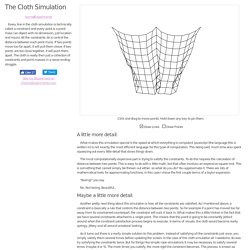
Javascript (the language this is written in) is not exactly the most efficient language for this type of computation. This being said, much time was spent squeezing out every little detail that slows things down. The most computationally expensive part is trying to satisfy the constraints. To do this requires the calculation of distance between two points. ~ Monocubed ~ Rémi Garcia – Blog » Faire bouger une voiture en CSS3. Les Media Queries CSS3 - Alsacréations. La spécification CSS3 Media Queries définit les techniques pour l'application de feuilles de styles en fonction des périphériques de consultation utilisés pour du HTML.
On nomme également cette pratique Responsive Web Design, pour dénoter qu'il s'agit d'adapter dynamiquement le design à l'aide de CSS. Ces bonnes pratiques permettent d'exploiter encore plus les avantages de la séparation du contenu et de la présentation : l'intérêt est de pouvoir satisfaire des contraintes de dimensions, de résolutions et d'autres critères variés pour améliorer l'apparence graphique et la lisibilité (voire l'utilisabilité) d'un site web. Les plateformes exotiques sont concernées en premier lieu : navigateurs mobiles et tablettes, écrans à faibles résolutions, impression, tv, synthèses vocales, plages braille, etc. Approche historique. Why you want to use the :any() CSS selector. Since Firefox 4 was relesed, loads of new (CSS) features were released into the wild.
Ofcourse, this is a great thing, since Firefox has a rock solid place as 2nd most popular web browser. More people will actually be able to see all the nifty stuff you'll create using CSS. I recently came accross a CSS selector that was included in Firefox 4 (and is added to Webkit (nightly) as well), called the :any() selector. We'll take a look at what this selector does, and why you would want to use it. Créer des animations en CSS3 et HTML5 facilement. Fancy transitions. [Google Code] Vive HTML5 ! Sass - Syntactically Awesome Stylesheets. 22 Excellent HTML5 Tutorials. HTML5 is giving web designers and developers new capabilities in the world of web development. HTML5 Starter Pack - Un template HTML5 et CSS3 pour bien démarre. Video + canvas = magic.
10 CSS3 Properties you Need to be Familiar with. We've already covered the thirty CSS selectors that we should all memorize; but what about the new CSS3 properties? Though most of them still require a vendor-specific prefix, you can still use them in your projects today. In fact, it's encouraged! The key is to first determine whether or not you're okay with a slightly different presentation from browser to browser.
Are you okay with, say, IE displaying 90 degree corners, rather than slick rounded ones? iPhone4 on pure CSS3!!! Apple nous fait une démonstration de l'HTML 5. 40+ Really Useful CSS3 Techniques & Tutorials. CSS3 Minimalistic Navigation Menu – Tutorialzine. Martin Angelov As you have probably heard by now, CSS3 animations are a powerful tool, which enables you to create animations which run without the need of applying additional scripting to the page. What is even better, in the next generation of browsers we will have even more powerful tools, including 3D transformations (already present in Safari). But what difference does it make for us today?
At the moment only three browsers give you the ability to animate CSS properties – Chrome, Safari and Opera, which together take up only a small part of the browser market. Firefox is expected to soon join the club, and with the impending release of IE9, it suddenly makes sense to start leveraging this technique. So today we are making something practical – a simple CSS3 animated navigation menu, which degrades gracefully in older browsers and is future-proofed to work with the next generation of browsers.
The XHTML. 3 Advanced CSS3 Techniques You Should Learn. 55 Excellent Examples of Websites Using HTML5. CSS3 Please! The Cross-Browser CSS3 Rule Generator. 23 Useful Online HTML5 Tools. Are you aware that HTML5 is captivating the web by leaps and bounds? This new language is used for displaying the content on net. One can also add in audios, videos, various fonts, web graphics, drag and drop, animations to make your pages more colorful and informative. It is simply a renewed and much better version of the XHML1 or HTML4 and is also compatible to those versions.
The online sprite tool box compresses your image and puts your image in a sprite. This compression will definitely increase the speed of your images and the time of loading. The pattern generator tool is good for web designers to make header backgrounds and pages. The online HTML5 Tools audio maker tool brings in new features of the audio. CSS Filter Effects Landing in WebKit. Background Filter effects have been around for awhile but were designed to work in SVG. They're fantastically powerful at applying effects like color intensity, warping, or blurring to an image before it's composited and rendered into the document. 8 examples of stunning CSS3 text effects. iPhone Style Checkboxes With CSS3 « tobypitman.com. 30 Incredibly Useful & Fun HTML5 Mobile Apps. With a combined app count that exceeds about 400,000 in the app stores of Apple & Android, why would anyone want to use mobile web apps?
Openness and a level playground are the two things that keep web developers going. CSS3 Sidebar Full Height Background Color. Learn HTML5: 10 Must Read Lessons. Flash contre HTML5 : 3, 2, 1 partez ! OIPlayer jQuery Plugin - Open Images Platform. 29 Useful Things you can do with CSS3. Pure CSS3 Bitmap Graphics.