
Get more app downloads with Tapstream. Jairajs89/Touchy.js - GitHub. Remote-Tilt - emulate motion events. IxD Gestures. Tool: Open Source App For Easy (And Beautiful) Viewing Of The iOS SDK Documentation On iPhone And iPad. This app is just a great idea, and a very nice implementation allowing you to view the iOS documentation on your iOS device.
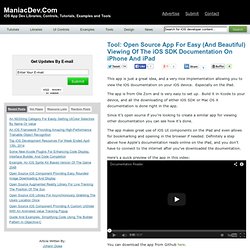
Especially on the iPad. The app is from Ole Zorn and is very easy to set up. Build it in Xcode to your device, and all the downloading of either iOS SDK or Mac OS X documentation is done right in the app. Since it’s open source if you’re looking to create a similar app for viewing other documentation you can see how it’s done.
The app makes great use of iOS UI components on the iPad and even allows for bookmarking and opening in the browser if needed. Here’s a quick preview of the app in this video: You can download the app from Github here. If you want to view the iOS documentation on your Kindle Ole has a Python script converting the Apple developer documentation to the mobipocket format that can be found here. Very handy for viewing documentation on the road. HTML5 WebSocket Powered Realtime Messaging Service. Launch And Market Your New iPhone App Like A Pro.
A ridiculous amount of work goes into successful app release. From planning and sketching to design and development, simply getting the talent together in one room can be a difficult task. But what if you’ve built a great app and just don’t have the connections or know-how to make it big. Instead of risking your entire launch by “winging it,” there’s a service out there that can help, and it’s affordable too. StartupPlays, in collaboration with the creator of Tapity, is a new platform that helps startups execute like pros in every aspect of their business without wasting time searching online, watching videos, or learning as you go. As explained by the creators:
Integrate Text to Speech and Speech Recognition. Zucchini iOS testing framework. Parse. App Store Analytics for iOS and Android developers. How To Market Your App: Five Tips From Marco Arment. Marco Arment is an industrious guy.
When not hard at work on his massively popular Instapaper service, he’s busy posting insight to his personal blog and refining its custom-built Second Crack engine. And when he’s not doing that, Arment’s hosting the “Build and Analyze” podcast with friend and 5by5 founder Dan Benjamin. In the latest episode (number 54, “Snob Blend”), Arment and Benjamin share a handful of tips on how up-and-coming developers might gain traction and visibility (and sales!) For their apps. Suggested by developers in the show’s listening audience, the following points made it to air: Free Versions and Holiday Themes While traditional ads and marketing are an option, Steven Baughman of ScrapPad says, The only thing that got us any traction was releasing free versions of our apps that encouraged people to buy the paid app.
Don’t Make Games Benjamin Mayo, creator of Bingo Machine, believes that “hobbyist, low budget” game development is a disastrous business proposition. Business cards. For your apps. Need more downloads ? Create a bond with those you meet ensuring they will try your app. Lost in a sea of apps ? Distinguish yourself in the fierce market of mobile apps with our unique business card. Trouble being found ? Be easy to find and remembered with our high quality card that leads to your App Store page. DataZombies/DBi - GitHub. Aardwolf. Aardwolf is a remote JavaScript debugger for iPhone / Android / WindowsPhone 7 / BlackBerry OS 6+.

It is written in JavaScript. This is experimental software. Although it has been successfully tested with a JavaScript project consisting of more than 20.000 lines of code, it should not be considered a finished product. The edges are more than just a bit rough: the UI is clunky, you set breakpoints by entering JavaScript arrays into a text field, and it breaks completely if you don’t do everything just right. If you’re careful, though, you get to play with the following features: breakpointscode evaluation at breakpoint“break on next” breakpointsstep/continue execution controlexception reporting (also in async calls)JavaScript console remotingcall stack listing If you want to try it out, you can get the code on GitHub. Custom UI Controls for iOS and Mac OS X. 14 Free Mobile Application Development Icon Sets. The gap between the desktop/laptop and the mobile device is becoming smaller and smaller, it has never been a better time for mobile app development – The market is huge, very lucrative and highly profitable.
Our ever growing appetite for more powerful and better mobile devices has pushed the demand even higher for ever more powerful and better applications to accompany them. The expectation on the apps UI design is just as demanding. The design has to not only be consistent with whichever mobile OS you are developing for, it also has to be distinctive enough to be unique. And yes, we do love a well designed app. In this post we are sharing 14 free mobile application development icon sets. Android Icons This Android developer icon set includes 30 .png menu icons plus the additional source files (.eps) for further customization. 130 Glyphish iPhone Icons 160 iphone Toolbar Icons (The Working Group) Free iPhone App Icon Kit. This build-your-own iPhone icon kit comes complete with 20 sample vector icons and various backgrounds for hundreds of possible combinations.
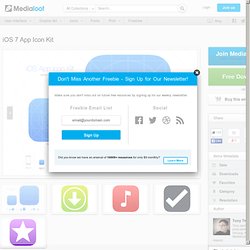
Using vector shape layers for easy customization, and Smart Objects for automatic updating of icon sizes, this kit makes it a breeze to create your own high quality quality, gorgeous iPhone, iPad and iOS 7 application icons. Update July 10 2013: iOS 7 ready We have updated the iOS App Icon kit to reflect the changes Apple have made to App Icons, including the new grid system, new sizes for the Spotlight search icons and the way the corners are rounded. Features. TestFlight » iOS beta testing on the fly. DoAT Labs - Touchy Boilerplate.