
iPad : 4 millions de ventes en 2010 et plus de 400 000 en France. On savait le buzz déclenché par la rumeur iPad.
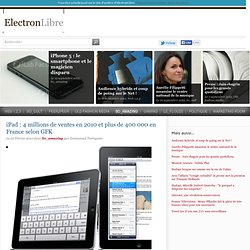
Puis la couverture médiatique de l’annonce qui a suivi, mais il manquait un indice important : comment l’iPad a-t-il été reçu par les consommateurs, et quels sont ceux qui seraient intéressés par un achat ? GFK France lève un coin de voile avec une enquête que nous dévoilons en avant première sur le Net. Et le moins que l’on puisse dire, c’est bien qu’encore une fois, Steve Jobs a réussi son coup... CELA DEVIENT une habitude. Lors du lancement de l’iPhone, les retombées en terme de budget de communication pour Apple avaient été estimées à près de 500 millions de dollars par les agences spécialisées. Notoriété Premier indice mesuré, la notoriété de la tablette. GamePad. iPad Application Design » Matt Legend Gemmell. I held a 6-hour workshop at NSConference in both the UK and USA recently, focusing on software design and user experience.
Predictably, an extremely popular topic was the iPad, and how to approach the design of iPad applications. I gave a 90-minute presentation on the subject to start each workshop, and I want to share some of my observations here. Please note: this is about the user interface conventions and considerations which apply to creating software for the iPad platform (and touch-screen tablet devices in general). Html5media - Project Hosting on Google Code. Video for Everybody! Video for Everybody is simply a chunk of HTML code that embeds a video into a website using the HTML5 <video> element, falling back to Flash automatically without the use of JavaScript or browser-sniffing.

It therefore works in RSS readers (no JavaScript), on the iPhone / iPad (don’t support Flash) and on many browsers and platforms. Thanks to the rapid adoption of HTML5 video happening right now, Video for Everybody isn’t the only solution around. It is not a neatly packaged, fully-featured solution for those unfamiliar with HTML.
VfE is for developers who either want something really simple they can quickly use on their blog or websites, or as a good starting point to develop their own custom solution. It does not use JavaScript. How It Works If your browser supports it, HTML5 video is used. If HTML5 video is not supported, Adobe Flash is used. Finally, if all else fails, a placeholder image is shown and the user can download the video using the links provided. VfE The Code. iA » Designing for iPad: Reality Check. By Oliver Reichenstein Over the last two months we have been working on several iPad projects: two news applications, a social network, and a word processor.
What the iPad is Missing (No, it’s not a Camera) I’m not an iPad naysayer. I forked over $700 on the first day of pre-ordering and my iPad hasn’t left my side, day or night, since it arrived on Monday. I’m with those who see the device and its new approach to computing as an exciting step forward, especially for media delivery. The possibilities for reviving the magazine and newspaper industries are exciting and real. Yet it’s exactly that part of media consumption, reading , that reveals what’s missing on the iPad: good typography.
Signs that type took a backseat in the iPad’s development were clear back in January when Steve Jobs demoed the device, revealing just four uninspired and uninformed font options in iBooks. Disappointing, but not surprising. The string of odd missteps began with the release of Mac OS X. A lack of Lucida italic could be considered a mild irritant, but Apple’s typographic neglect in OS X ran deeper. Then came the iPhone, its fantastic display with a high pixel-density enabled legible type at small sizes. 1. Safari Web Content Guide: Configuring Web Applications. A web application is designed to look and behave in a way similar to a native application—for example, it is scaled to fit the entire screen on iOS.

You can tailor your web application for Safari on iOS even further, by making it appear like a native application when the user adds it to the Home screen. You do this by using settings for iOS that are ignored by other platforms. For example, you can specify an icon for your web application used to represent it when added to the Home screen on iOS, as described in “Specifying a Webpage Icon for Web Clip.” You can also minimize the Safari on iOS user interface, as described in “Changing the Status Bar Appearance” and “Hiding Safari User Interface Components,” when your web application is launched from the Home screen. These are all optional settings that when added to your web content are ignored by other platforms.
Designing for the iPad. I decided a while back that I wasn’t going to get an iPad.

Instead, I’d wait for the second generation iPad next year. This has been my approach when it comes to new Apple products. Yes, I’m scared of the early adopter regret. As the launch date neared, my mind changed a bit. S Essential iPad Apps - Best ipad apps - Gizmodo. Gap + iPad = cool. Three iPad design choices that will influence how we read news o. So we don’t have to guess about what news apps on the iPad will look like any more. With Saturday’s debut of the device — which is, oh by the way, amazing — we now know how about a dozen major news organizations have chosen to present themselves on Apple’s new platform. I think it’s fair to say that we’ve seen no revolutionary apps to this point — solid, competent, but not revolutionary — but that doesn’t mean there aren’t already some important lessons to be learned from what’s already out there. After a weekend of playing around with all the news apps I could find, here are three design choices that I think are worth taking a closer look at.
Story-to-story navigation. For iPad is here! Two months ago, we sat glued to our browsers as details of the iPad started streaming out of Apple’s launch event.
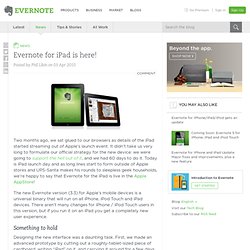
It didn’t take us very long to formulate our official strategy for the new device: we were going to support the hell out of it, and we had 60 days to do it. Today is iPad launch day and as long lines start to form outside of Apple stores and UPS-Santa makes his rounds to sleepless geek households, we’re happy to say that Evernote for the iPad is live in the Apple AppStore! The iPad: Apple’s Next Gold Rush. @Ed – I was the analyst who did the forecast, so a few points: First, the tablet market as whole will benefit from its ability to eat into many existing large-volume markets.

The obvious ones are netbooks, e-readers, and – of course – the media player market (like the Apple Touch). Gaming is going to be very significant. I think Sony and Nintendo have to be extremely worried, as portable gaming volumes are already getting hit hard by the Touch, and I think we’ll see the iPad eat into that market in a big way.