
Desktop - HD. How to connect a TV to computer, HDTV to PC or laptop. Sewell TVdeck PC to TV Converter - SW-23000, $29.95. Want a higher quality picture?
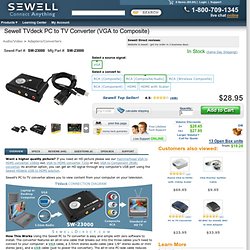
If you need an HD picture please see our Hammerhead VGA to HDMI converter 1080p our, VGA to HDMI converter 720p or our, VGA to Component (RGB) converter. As another option, you can get an HD signal through any computer's USB port using the Sewell HDdeck USB to HDMI solution. Sewell's PC to TV converter allows you to view content from your computer on your television. How This Works Using the Sewell PC to TV converter is easy and simple with zero software to install.
The converter features an all-in-one cable that breaks out into the three cables you'll need to connect to your computer: a VGA cable, a 3.5mm stereo audio cable (aka 1/8" stereo audio or mini stereo jack), and a USB cable (just to power the converter). Once the VGA, 3.5mm audio, and USB is connected, you'll just need to connect the red, white, and yellow (right/left audio and composite video respectively) ports to your TV with the provided cables.
Quality of Conversion Past Models. Stream Videos From the PC to a TV. From Wired How-To Wiki The web has turned into such a vast video megaplex that some brave souls are – gasp – giving up their cable TV and satellite boxes.

With sites like YouTube, Hulu, NBC.com and Netflix offering up everything from homespun videos to broadcast sitcoms and full-length movies, the cheapo web video option is getting more enticing all the time. And while a laptop is just fine for watching most of these videos, nicer yet is kicking back on the couch and watching them on a widescreen HDTV. So here are a few different ways to make that happen. This article is a wiki. Wired If you have a computer located near your TV, or want to plop your laptop next to it, there are several different ways to connect the two devices and stream video.
Most computers have a VGA, DVI or S-video output. If you have an S-Video output on your computer, check to see if it's a 7-pin or 4-pin. HD options Audio Wireless Of course, nobody likes wires. Media Players Xbox 360 and PlayStation 3 SlingCatcher TiVo. How to Watch Internet Videos on your TV - Bring the Web to your Living Room. You can enjoy Internet on your TV.

This guide reviews hardware devices that will let you watch web videos, streaming movies, TV shows and other Internet content right on your TV. When you have nothing interesting to watch on TV, you can always switch to the Internet for an unlimited supply of videos ranging from television shows, podcasts, music, full-length movies, news and even live concerts. Your computer screen is not always the best option to watch web videos, especially if the whole family wants to join in, so let’s look at some devices that will let you enjoy Internet TV on your widescreen television without requiring any complicated setup. Enjoy Internet Videos on your TV Apple TV – Connect the device to your TV using a HDMI or component video cable and you’ll be able to download movies, TV shows, podcasts and music from iTunes’ vast library directly through your TV. Vudu – Vudu has a large collection of movies in HD quality that you can instantly buy or rent using the Vudu box.