
Omnifocus to Omnioutliner Pro exporter. D-light ▶ MacOS X ▶ NeO. Scribe - Outliner for Mac OSX. Welcome. OmniOutliner 3. Outliner for iPad. MagicalPad - Notes & Outliner. ThinkBook. Dancing with OPML. I’ve talked several times about my reliance on OPML.

I’ve developed my OPML workflow over the years and perfected it in the crucible of writing The Book. I’m getting lots of e-mail asking for further details, so here goes. OPML, which stands for Outline Processor Markup Language, is an XML format for outlines. Over the past few years, it has become the digital intermediary for getting your planning and outlining ideas from one app to another. Currently, it is enjoying wide adoption from Mac and iOS developers, which makes it particularly useful to writers and others who prefer to sort out those jumbled ideas knocking about in their brains. Short Answer It lets you choose your own weapon for organizing your thoughts. Slightly Longer Answer Most large projects (and in my case small) don’t start out with you sitting at a blank piece of paper and writing your first sentence. There are several developers that support OPML on Mac OS X and iOS. MindNode Pro iThoughtsHD OmniOutliner Scrivener The Seed.
Priority Matrix. Outliner. View of very basic outline with graphics.
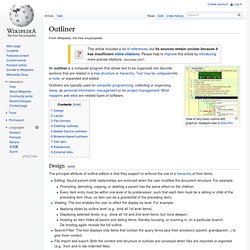
Notepad view in Ecco Pro. Outliners are typically used for computer programming, collecting or organizing ideas, as personal information management or for project management. Mind mappers and wikis are related types of software. Design[edit] The principal attribute of outline editors is that they support or enforce the use of a hierarchy of their items. Editing: Sound parent-child relationships are enforced when the user modifies the document structure. Layout[edit] There are two basic types of outliners: one-pane or intrinsic, and two-pane or extrinsic, each with its strengths and weaknesses.
A one-pane outliner is known as an intrinsic outliner because the text itself is organized into an outline format—individual sections (such as paragraphs) of text can be collapsed or expanded, while keeping others in view. A two-pane outliner separates structure from content—the structure is extrinsic to the text. Ecco Pro with EccoMV pane. File formats[edit] Top of Tree - Tree, outliner for Mac OS X. Horizontally expanding outliner. Tree view In tree view, Tree displays your data in a horizontally expandable tree diagram.
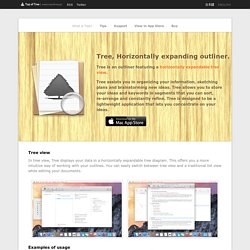
This offers you a more intuitive way of working with your outlines. You can easily switch between tree view and a traditional list view while editing your documents. Examples of usage Tree can be used for Writing a novel Travel planning Recording ideas Writing legal briefs Great for a quick hierarchy for websites Taking notes for academic researches and writings ... Tab Bar * Newly added button on the far right of the tab bar. . * In Tree 2, the tab’s function changed to focus on showing items in separate tabs. Plain Text and Rich Text Tree now supports a new file type to handle rich text with the ability to choose from multiple fonts and styles ( bold, underline, italic ).
You can select the document text format from the format menu or change the new document text format in the preferences. Input and Output. From brainstorm to outline: Why I use OPML. Successful projects start with thorough planning.
You aren’t going to create a compelling business proposal by scratching a few notes on a cocktail napkin then firing up Keynote. You need to plan first. For me, planning means making an outline, and outlining means using OPML. OPML, which stands for Outline Processor Markup Language, is an XML file format created specifically for outlines.
It’s supported in a wide variety of Mac and iOS apps; any app that reads OPML can open files from any other app that writes it. Depending on the app, you can use OPML to create both formal outlines and less formal mind-maps. OPML is so ingrained into my workflow that every business writing project, contract, presentation, and proposal I work on starts life as an OPML file on my iPad. Start with the map If you’ve never created a mind-map before, it's a free-form way to collect and organize ideas. Most of my projects (including this article) start life as a mind-map on my iPad. Download iLiner for Mac - Quick and easy outliner. MacUpdate.com. Outliner Software: Outlining Software, PIMs, Knowledge and Information Management.