
Box2D - Home. The Shapes of CSS. Learn Development at Frontend Masters CSS is capable of making all sorts of shapes.
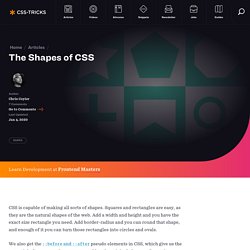
Squares and rectangles are easy, as they are the natural shapes of the web. Add a width and height and you have the exact size rectangle you need. Add border-radius and you can round that shape, and enough of it you can turn those rectangles into circles and ovals. We also get the ::before and ::after pseudo elements in CSS, which give us the potential of two more shapes we can add to the original element. Square Rectangle Circle Oval Triangle Up Triangle Down Triangle Left Triangle Right Triangle Top Left Triangle Top Right Triangle Bottom Left Triangle Bottom Right Curved Tail Arrow via Ando Razafimandimby Trapezoid Parallelogram. HTML5 Mobile Apps. Ceaser - CSS Easing Animation Tool - Matthew Lein. HTML5-Visual-Cheat-Sheet-Reloaded1. CSS3 @font-face Design Guide. Although CSS3 @font-face is supported by most major browsers (IE, Firefox, Chrome, and Safari), but not all.
When it doesn't, your custom fonts might break the layout or come out with undesired results. In this article, I will explain the common issues with using custom fonts, picking the matching fallback web safe fonts, and how to create a perfect fallback font style with Modernizr. Common Mistake One common mistake that most people make when implementing custom fonts is not specifying the fallback fonts or picking the wrong fallback fonts. Web Safe Fallback Fonts When using custom fonts, it is important to include the web safe fonts as fallback. Layout Issues Because every font face has its own width, height, weight, kerning (letter-spacing), etc., some fonts are not substitutable with the web safe fonts.
This might causes layout issues as shown in the image below where the fallback font extends off the boundary. Modernizr. HTML5 Rocks - A resource for open web HTML5 developers. HTML5 Cross Browser Polyfills - GitHub. The No-Nonsense Guide to HTML5 Fallbacks So here we're collecting all the shims, fallbacks, and polyfills in order to implant HTML5 functionality in browsers that don't natively support them.
The general idea is that: We, as developers, should be able to develop with the HTML5 APIs, and scripts can create the methods and objects that should exist. Developing in this future-proof way means as users upgrade, your code doesn't have to change but users will move to the better, native experience cleanly. Looking to conditionally load these scripts (client-side), based on feature detects? See Modernizr.Looking for a guide to write your own polyfills? Svgweb by Brad Neuberg & others Fallback via FlashSnap.SVG from scratch by the author of Raphaël (Dmitry Baranovskiy) Abstracted API.
FakeSmile by David Leunen Canvas Web Storage (LocalStorage and SessionStorage) Non HTML5 API Solutions Sectioning Elements Video VTT: Video Timed Track (subtitles) Audio Audio Data API IndexedDB. CSS3 Please! The Cross-Browser CSS3 Rule Generator. HTML5 Boilerplate - A rock-solid default template for HTML5 awesome. Initializr - Start your HTML5 project in 15 seconds! HTML5 & CSS3 Support, Web Design Tools & Support - FindMeByIP - CSS3 & HTML5 Browser Support.
Chaîne de ThytOS HTML5 Tutorials and Techniques That Will Keep You Busy - Noupe Design Blog. Feb 23 2011 Ever since the latest revision of HTML has launched, internet marketers have switched to HTML5 due to its several new features which facilitate Web development distinctly.
It has opened new doors to designers and developers and as you may have already noticed, the use of Flash in Web and internet applications has significantly dropped. In today’s post, we’ve gathered some very useful tutorials that will help you achieve a good command of HTML5. Please feel free to share with us other useful tutorials that have kept you busy!
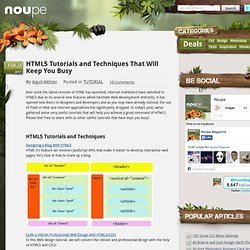
HTML5 Tutorials and Techniques Designing a Blog With HTML5 HTML 5′s feature set involves JavaScript APIs that make it easier to develop interactive web pages; let’s look at how to mark up a blog: Code a Vibrant Professional Web Design with HTML5/CSS3 In this Web design tutorial, we will convert the vibrant and professional design with the help of HTML5 and CSS3: CSS3 & HTML5 - Einstieg in die neuen Webstandards. WTF is HTML5 (Infographic)