
background preloader

Articulate

Facebook Twitter

Exemple scénario multibranche. Scénario multi-branches dans articulate. Creating Branching E-learning Scenarios Here's a basic introduction to using branching, hyperlinking, slide masters and customizing player templates to create multi-path learning paths within a Presenter course. The idea behind the project was to simulate loading unique content based on learner selection. Navigation icons are included for learners to return to start screen or jump over to another learning path at any time. This is a start-to-finish series. Parts 4 and 5 are navigation- and branching-specific so jump ahead if you're comfortable with slide masters and hyperlinking. Also included is a small, visual map in top right corner. Preview: final project Download source files: PPT2007 | PPT2003 Screencast: Anyway, hope you find this useful. As always, we'd love to see what you come up with so please share questions as well as samples! Construire des Scenarios E-Learning.
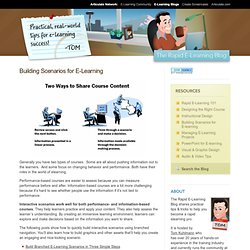
Generally you have two types of courses. Some are all about pushing information out to the learners. And some focus on changing behavior and performance. Both have their roles in the world of elearning. Performance-based courses are easier to assess because you can measure performance before and after. Information-based courses are a bit more challenging because it’s hard to see whether people use the information if it’s not tied to performance. Interactive scenarios work well for both performance- and information-based courses. The following posts show how to quickly build interactive scenarios using branched navigation. 200 Free Rapid E-Learning Tutorials. A few weeks ago I offered some advice on how to become an elearning pro without spending a dime. The essence of that post is: You have access to a lot of free tips and tricks.
So there are plenty of opportunities to learn and it doesn’t cost you anything more than your time. Practice doing what you learn. The learning is only going to happen if you do more than watch the tutorials and read information. Apply some of the tips and tricks to your projects. I also offered up a small challenge and your peers responded by creating a number of tutorials. Click here to view the tutorial. Here’s a quick mock up using the ideas from Linda’s tutorial. Click here to view the prototype.

Below is a list of great tips and tricks that you can apply to your elearning courses right away. Creating PowerPoint Graphics Some of these tips are really practical and probably work right away. Create transparent background for your images in PowerPoint. PowerPoint Animation Tips & Techniques Rapid E-Learning. PDF Guide du rapid learning.