OMG! Ubuntu! | Everything Ubuntu. Daily. How to fix Pulseaudio and Skype crappy sound glitches, choppy sound and crackling on Debian GNU / Linux | Walking in Light with Christ - Faith, Computing, Diary. I've experienced plenty of problems with Pulseaudio and Skype output sound hell crappy. This stupid proprietary program Skype is a total crap … Anyways again thanks to ArchLinux's wiki, I've used the two mentioned steps to fix all this Skype in / out problems … 1. Fix problems with Glitches, voice skips and crackling In file /etc/pulse/default.pa its necessery to substitute the line; load-module module-udev-detect with load-module module-udev-detect tsched=0 2.
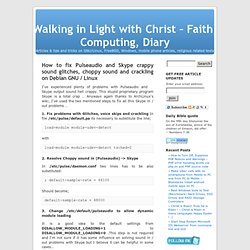
In /etc/pulse/daemon.conf two lines has to be also substituted: ; default-sample-rate = 44100 Should become; default-sample-rate = 48000 3. It is a good idea to the default settings from DISALLOW_MODULE_LOADING=1 to DISALLOW_MODULE_LOADING=0 .This step is not required and I'm not sure if it has some influence on solving sound in / out problems with Skype but I believe it can be helpful in some cases.. So in /etc/default/pulseaudio Substitute: to; 4. After the line is changed and substituted a restart of PulseAudio is required. Ubuntu Vibes | Daily Ubuntu Linux Updates. UbuntuXtreme | Hardware and Overclocking Ubuntu CommunityUbuntuXtreme. Samsung Galaxy Note II GT-N7100, N7105. Linux and Life ~ daily Linux - Ubuntu news, reviews and tutorials. Linux Howtos & Tutorials | Unixmen.