
Herramientas. Dougal Matthews Home. This is my unofficial part five for the Django tutorial.

I've attempted to write this in a similar style to the Django documentation and hopefully this will be useful for those looking for the next step after the tutorial or trying out testing with django for the first time. TDDjangoTutorial. Test-First!

So, before we're allowed to write any real production code, we write some tests. We start by writing some browser tests - what I call functional tests, which simulate what an actual user would see and do. We'll use Selenium, a test tool which actually opens up a real web browser, and then drives it like a real user, clicking on links and buttons, and checking what is shown on the screen. These are the tests that will tell us whether or not our application behaves the way we want it to, from the user's point of view.
ClockingIT. Django-autocomplete - jquery AutoComplete for ForeignKey & ManyToManyField. Uses same syntax as the search for django-admin up: the latest version in Downloads - fixed compatibility with Django 1.3 - cleaned java scripts - added support for inline AutocompleteStackedInline, AutocompleteTabularInline - added a field WildModelSearchInput, it can be used in the admin forms requirements copy to the appropriate folder media\admin\js\jquery.autocomplete.js media\jquery.autocomplete.css.

Tags · tuffy/python-audio-tools. CSS: Menu horizontal, desplegable y bonito. Email Marketing and Email List Manager. Sass - Syntactically Awesome Stylesheets. Extending the jQuery Sortable With Ajax & MYSQL ~ Wil Linssen. I’ve had a lot of response to the jQuery sortable list post I wrote a while back, and a lot of them ask how to send the results to a database.

I’ve often said the best thing to do would be to update it by AJAX, but I’ve never really explained how. So here it is! There was a bug a few people noticed with the new jQuery UI a short while ago that stopped the update callback working. That bug has since been rectified and all is kosher again. I have since updated the example to the latest jQuery and UI downloads. File: SASS_REFERENCE. Sass is an extension of CSS that adds power and elegance to the basic language.
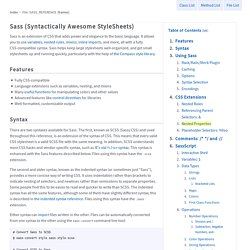
It allows you to use variables, nested rules, mixins, inline imports, and more, all with a fully CSS-compatible syntax. Sass helps keep large stylesheets well-organized, and get small stylesheets up and running quickly, particularly with the help of the Compass style library. Features Fully CSS-compatible Language extensions such as variables, nesting, and mixins Many useful functions for manipulating colors and other values Advanced features like control directives for libraries Well-formatted, customizable output Syntax.
Simple horizontal list. Horizontal CSS List Menu. Posted on March 27, 2008 in CSS Tutorials This tutorial will show you how to make a horizontal CSS list menu.

No images, no javascript. Just a simple, cross browser compatible CSS list menu! Blog of Ryan Bigg - Ubuntu, Ruby, RVM, Rails, and You. SoundManager 2: JavaScript Sound For The Web. SoundManager 2 Demo: Play MP3 Links on a page. 360° MP3 player UI demo (SoundManager 2): Javascript + Canvas Visualization, basic example. SoundManager 2 Demo: Play MP3 Links on a page. Inline MP3 Player Example: Fancy* CSS 3 version *CSS 3 border-radius supported only by Firefox 2.x+, Safari (2.x?)

- sadly, not IE 8. How It Works Lightweight (single JS click event handler) Uses existing SoundManager 2 API CSS for UI, easy to modify to taste. Pasar funcion como parametro. 2: Multiples parametros. : Software over the rainbow. Glossy.js (javascript glossy image effect) <form name="lst" id="lst" method="post" action=".. glossy.js 1.8 allows you to add corners and shading and shadow to images on your webpages (alternatively: corner.js).
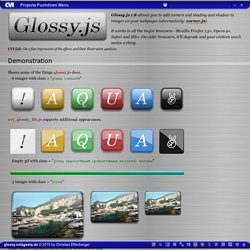
It works in all the major browsers - Mozilla Firefox 1.5+, Opera 9+, Safari and IE6+. HTML5 Video Player. Video.js is a JavaScript and CSS library that makes it easier to work with and build on HTML5 video.

This is also known as an HTML5 Video Player. Video.js provides a common controls skin built in HTML/CSS, fixes cross-browser inconsistencies, adds additional features like fullscreen and subtitles, manages the fallback to Flash or other playback technologies when HTML5 video isn't supported, and also provides a consistent JavaScript API for interacting with the video. What's HTML5 Video? HTML is the markup language that makes up every page on the web. .animate. Description: Perform a custom animation of a set of CSS properties.
The .animate() method allows us to create animation effects on any numeric CSS property. The only required parameter is a plain object of CSS properties. This object is similar to the one that can be sent to the .css() method, except that the range of properties is more restrictive. Animation Properties and Values. Arguments: A JavaScript Oddity. Arguments is the name of a local, array-like object available inside every function. It’s quirky, often ignored, but the source of much programming wizardry; all the major JavaScript libraries tap into the power of the arguments object. It’s something every JavaScript programmer should become familiar with. Inside any function you can access it through the variable: arguments, and it contains an array of all the arguments that were supplied to the function when it was called. It’s not actually a JavaScript array; typeof arguments will return the value: "object".
You can access the individual argument values through an array index, and it has a length property like other arrays, but it doesn’t have the standard Array methods like push and pop. Create Flexible Functions. Tienda de Equipos Médicos. Tutorial. Free source code hosting — Bitbucket.