
Untitled. Magic css3 animations. BootMetro. Ligature Symbols. By Kazuyuki Motoyama Logos Please copy & paste this code to your HTML file or Stylesheet.
Jetstrap - The Bootstrap Interface Builder. SoFresh! - It makes your CSS yummy. Animate.css - a bunch of plug-and-play CSS animations. Edit this Fiddle. Les 30 sélecteurs CSS à connaître absolument. Tomsyweb.com Buy this domain The owner of tomsyweb.com is offering it for sale for an asking price of 345 GBP!

Related Searches This page provided to the domain owner free by Sedo's Domain Parking. Styleguide. 20 Awesome Resources for Twitter Bootstrap Lovers. Generators Bootstrap Custom Build. 21 outils et générateurs CSS pour développeurs web. Fluid CSS3 Slideshow with Parallax Effect. In this tutorial we will create a slideshow with a parallax effect using several CSS3 properties.
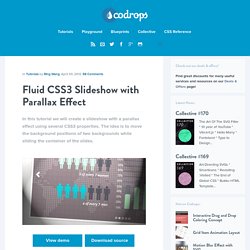
The idea is to move the background positions of two backgrounds while sliding the container of the slides. View demo Download source In this tutorial, we are going to create a slideshow with a parallax effect with the help of some CSS3 properties. We’ll use radio buttons and sibling combinators for controlling which slide is shown.
There will be two backgrounds and the idea is to change the background positions and the position of the slider with transitions in order to create a slight parallax effect. The graphics used in the demo are by: 5Milli (Global Vector Map) and by WeGraphics (Free Vector Infographic Kit). Please note: the result of this tutorial will only work as intended in browsers that support the respective CSS properties. The Markup We will “connect” the input elements to the division with the class sp-content by using the general sibling combinator. The CSS. CSS3 Shapes Resource. A Pure CSS3 Cycling Slideshow.
Quick summary ↬ Thanks to CSS3, we can create effects and animations without using JavaScript, which will facilitate the work of many designers.
Thanks to CSS3, we can create effects and animations without using JavaScript, which will facilitate the work of many designers. Create the Illusion of Stacked Elements with CSS3 Pseudo-Elements. CSS3 Structural Pseudo-class Expressions Explained. You probably know that the CSS3 spec includes a number of structural pseudo-classes.

Four of these pseudo-classes use function-like syntax that allow an argument to be passed in using parentheses. These are: The purpose of the parentheses is to allow one or more elements to be selected based on a keyword (either odd or even), an integer, or an expression. The keywords and the integer are pretty straightforward. A value of “even” or “odd” selects the even or odd elements, respectively, and an integer selects the nth of the targeted element.
The expressions, on the other hand, are a little more complicated, but not too bad once you mess around with them a little. Expression Syntax. Using the LESS CSS Preprocessor for Smarter Style Sheets. Advertisement As a Web designer you’re undoubtedly familiar with CSS, the style sheet language used to format markup on Web pages.

CSS itself is extremely simple, consisting of rule sets and declaration blocks—what to style, how to style it—and it does pretty much everything you want, right? Well, not quite. You see, while the simple design of CSS makes it very accessible to beginners, it also poses limitations on what you can do with it. These limitations, like the inability to set variables or to perform operations, mean that we inevitably end up repeating the same pieces of styling in different places. Enter the CSS preprocessor. What’s the difference? 5 Steps to Drastically Improve Your CSS Knowledge in 24 Hours. You’ve been coding for a while now and know your way around a CSS file.
You’re certainly no master, but with enough fiddling you can get where you want to go. 50+ Awesome CSS3 Techniques for Better Designs. CSS3 is gaining momentum, despite the fact that the standard hasn’t even been finalized.
There are hundreds of tutorials out there to teach designers how to use it, but unfortunately a lot of them cover the same ground. And some of the tutorials teach designers to do things that they might not think of as useful, though the techniques can usually be adapted to fit a project perfectly. WWF. Cssarrowplease. When can I use... Support tables for HTML5, CSS3, etc. L’intégration de sites web : pixel perfect ou dégradation progressive ? « Moon Websites. L’intégration d’un site Internet est une étape délicate dans la création (ou la refonte) d’un site web. Elle consiste à transformer une maquette au format image en une page web (à l’aide de code HTML). L’une des grandes difficultés du métier d’intégrateur est de faire en sorte que le code HTML de la page soit interprété de la même manière quel que soit le navigateur (Firefox, Chrome, Internet Explorer…) et la version du navigateur (par exemple : Internet Explorer 7, 8 ou 9).
HTML5 & CSS3 Support, Web Design Tools & Support - FindMeByIP - CSS3 & HTML5 Browser Support. The Lowdown on Absolute vs. Relative Positioning. When I was first learning web development, the style side of CSS seemed straightforward and fun, but performing layout feats seemed like a confusing mess.

I sort of felt my way around without a solid understanding of how things like positioning and floats worked and as a result it would take hours to perform even simple tasks. If this situation sounds familiar, then this article is for you. One of the real revelations that I had early on was when I was finally able to wrap my head around how positioning contexts worked, especially when it came to the difference between absolute and relative positioning. CSS3 Responsive Slider / Carousel Using Radio Buttons. Select catcher Created by Ian Hansson (@teapoted) Art from Brendan Zabarauskas (@bjzaba_).
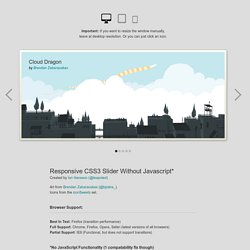
Icons from the iconSweets set. Browser Support: Best In Test: Firefox (transition performance) Full Support: Chrome, Firefox, Opera, Safari (latest versions of all browsers) Partial Support: IE9 (Functional, but does not support transitions) Ultimate CSS Gradient Generator - ColorZilla.com. LESS « The Dynamic Stylesheet language. 960 Grid System. -prefix-free : du beau, du bon, du mauvais ? CSS3 Solutions for Internet Explorer. Advertisement. Initiation au positionnement en CSS (Partie 1) Pour éviter l'usage inconsidéré des tableaux de mise en page, l'utilisation correcte de chaque élément (balises div, p, h1, ul, li, etc.) ainsi que leur positionnement en CSS est dorénavant indispensable. Les éditeurs HTML visuels n'utilisent qu'une infime partie des possibilités des balises (faussement nommées "calques" en général), ce qui les rend souvent peu compatibles et peu pratiques.
HTML & CSS : Design and Build Websites, le livre - livre-html. Cross-Browser CSS3 Rule Generator. Use Pseudo Elements to Create an Image Stack Illusion. Today we’re going to see if we can take a single image inserted via HTML and make it look like a messy stack of images using only CSS. The key: pseudo elements. Along the way we’ll see how embarking on a project like this can quickly lead to some messy code and how we can combat that with some awesome DRY coding practices.
The Challenge I was checking out some of the amazing content on our new downloads site, Pixels Daily, and I found a great little free PSD called Stacks that helps you quickly and easily build a stack of Polaroid-esque images in Photoshop.