
Kola Kid - sniffing stardust on the dancefloor by kolakid. Huge Pack of old games running Directly on OS X ! Indiana jones fate of atlantis mac. Begin your quest with Google Maps 8-bit for NES. We're constantly making improvements to Google Maps in order to take advantage of better hardware and web standards.

For example, last October we launched MapsGL to capitalize on the improved graphics capabilities offered by WebGL. In our pursuit of new digital frontiers, we realized that we may have left behind a large number of users who couldn't access Google Maps on their classic hardware. Surprisingly, the Nintendo Entertainment System (NES) was unsupported, despite its tremendous popularity with over 60 million units sold worldwide.
Our engineering team in Japan understood the importance of maps on retro game systems. With the power of Google’s immense data centers, and support from Nintendo and Square Enix, we were able to overcome the technical and design hurdles of developing 8-bit maps. With Google Maps 8-bit, you can do all the things you already do on regular Google Maps. Coming soon to the Google Store Update April 1, 2012 9:45 PST: Happy April Fools! How to make an animated GIF with 8-Bit Characters: Part 1: Design. Have you ever wanted to make a kick ass animation of 8-BIT characters tearing each other to shreds?

Well now you can. In this tutorial, I will take you through the process of creating vectorized 8-bit characters for use in an animated GIF. I’ve also included the vector source files of the characters and objects so you can create your own animation. So start jamming to The Advantage and get started! 1. To begin, open Illustrator and create a new document. 2.
Make 8-Bit Images In Photoshop. Create 8-Bit Style Graphics using Adobe Photoshop. How To Make an 8-Bit Avatar In Photoshop. How to Make an 8-Bit Forest in Photoshop. Create Cool 8-Bit Style Pixel Art from Ordinary Images. I have to be honest.
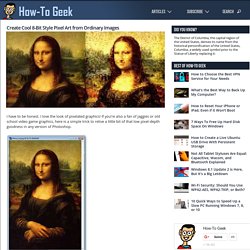
I love the look of pixelated graphics! If you’re also a fan of jaggies or old school video game graphics, here is a simple trick to relive a little bit of that low pixel-depth goodness in any version of Photoshop. I start with an iconic image, but use any you prefer. Lisa will be recognizable in any pixel depth, so she’s a good candidate. Press to open levels. Lisa has more highlights and we can see a lot more of the detail in the dark areas. Resizing causes Photoshop to anti-alias your image. To bring up Image Size. I size mine down to a width of 75 pixels. As you can see, it’s a pretty huge change! From there, change the pull-down tab that reads “Pixels” to “Percent.” Voila, we’ve created simple, blocky goodness from an ordinary graphic! You can scale this up to any size you want and it will keep this look, as long as you resize in multiples, ie. you don’t blow it up to 133 percent, but rather 200 percent, 400 percent, etc.
Resultados de la Búsqueda de imágenes de Google de. Izak Smells: Adventure Time Background. Thought that this recreation of Jake the Dog & Finn the Human from Adventure Time deserved a post of its own.

Requested background by a user over on G+. I'm really covering old ground lately. Also did a quick whip up of Faith from Mirrors Edge. DICE! EA! Question. Canvas Cycle: True 8-bit Color Cycling with HTML5. ARTMONKEYMG: 8-BIt Background.